Best AI Image Editors for DTC Brands (2026)
A practical rundown of the top AI image editors for DTC in 2026 — what each does well, where they fall short, and which fit real product workflows.
Key Takeaways
Most AI image editor roundups are built for designers and bloggers — not DTC operators who need product-accurate, on-brand, channel-ready output at volume. The right evaluation criteria are completely different.
Brand consistency is the sharpest dividing line in this category: most tools start each session from scratch. Only purpose-built DTC agents maintain persistent brand memory across every output and every channel.
A traditional product photography day rate runs $500–$5,000 depending on the studio — before studio rental, retouching, or model fees. AI compresses the same output to minutes at a fraction of that cost.
Midjourney produces the most visually striking images in the category, but struggles with product text, logos, and packaging accuracy — a real liability for ecommerce listings and ads.
The best tool for your brand depends on your workflow, not the longest feature list. A solo operator running quick social graphics has different needs than a DTC brand producing 500 ad variants a week.
The best AI image editor for a DTC brand is the one that knows your brand, handles every channel, and outputs production-ready files — not just a raw image to clean up. The tools that dominate general roundups (Canva, Midjourney, Adobe Firefly, ChatGPT) are built for designers, bloggers, and creative explorers. DTC operators, however, face a different problem: a constant stream of product-accurate, on-brand images across ads, email, social, and Amazon, produced fast enough to keep up with launch cadences and paid media refresh rates.
This comparison evaluates six tools specifically on what DTC brands and their agencies actually need. Every tool is scored on the same five criteria. Skimmers: the comparison table is two sections down.
How We Evaluated These AI Image Editors
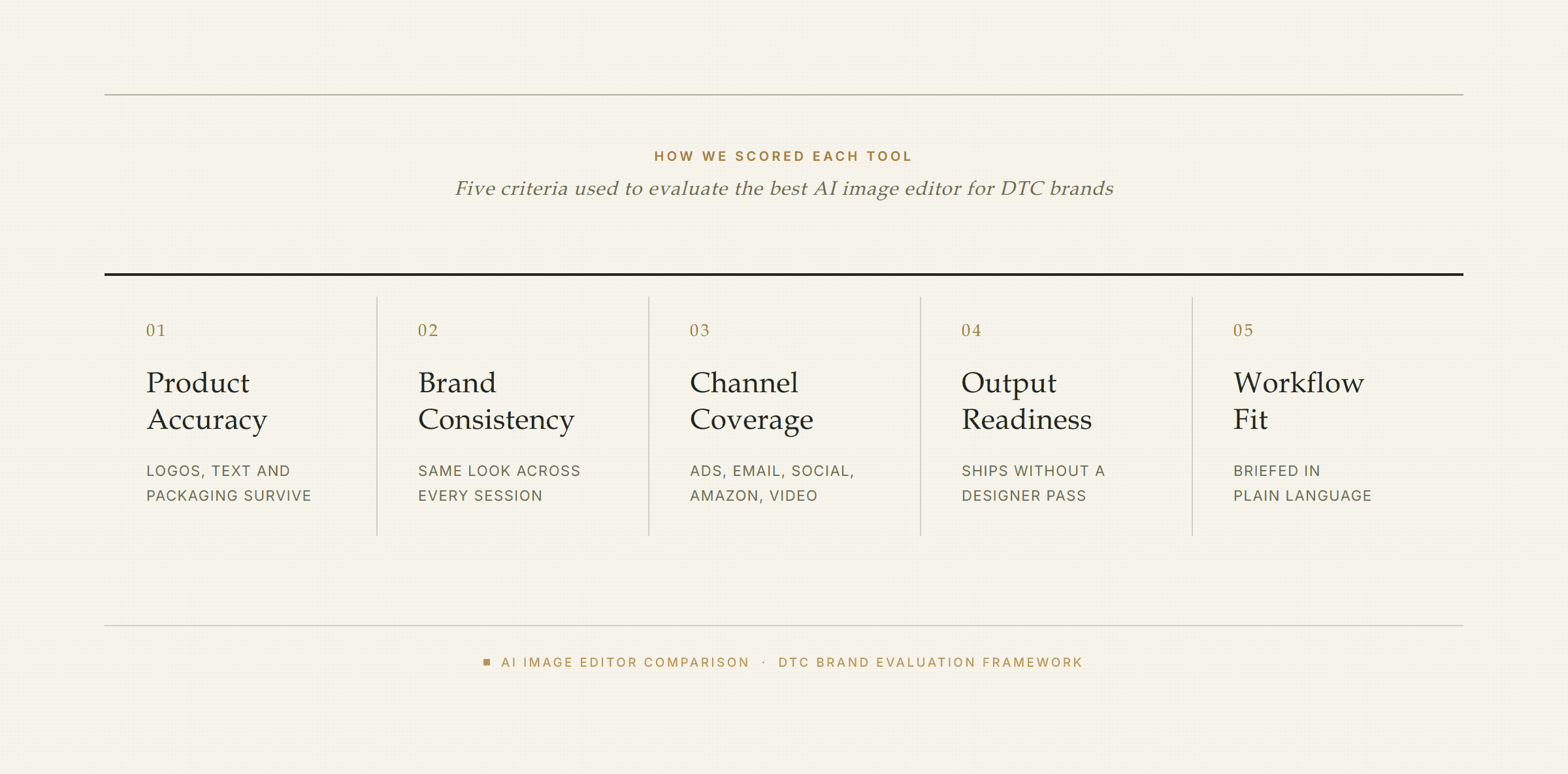
The five criteria this comparison actually scores each AI image editor on.
Every AI image editor in this list was scored on five criteria that matter specifically to DTC operators — not general creative or artistic use cases. In other words, if you're looking for the best tool for editorial photography, illustration, or hobbyist use, this is not that comparison.
The five DTC-specific criteria:
Product accuracy — Does it render product details, text, and packaging correctly? Inaccurate product images cost you in returns and lost trust.
Brand consistency — Does it remember your identity across sessions, or does every session start from scratch?
Channel coverage — How many output formats does it handle natively: ads, email, social, Amazon, pages, video?
Output readiness — How much designer cleanup is needed before the file is live-ready?
Workflow fit — Can a non-designer brief it in plain language, or does it require prompting expertise or design tool skills?
Quick Comparison: AI Image Editors at a Glance
Tool | Product Accuracy | Brand Consistency | Channel Coverage | Output Readiness | Workflow Fit | Best For |
|---|---|---|---|---|---|---|
Olivia | ★★★★★ | ★★★★★ (persistent Brand DNA) | ★★★★★ (photos, ads, email, social, Amazon, video) | ★★★★★ (~90% production-ready) | ★★★★★ (plain-language brief) | Full-stack DTC creative at volume |
Canva AI | ★★★☆☆ | ★★★☆☆ (Brand Kit, not persistent across sessions) | ★★★☆☆ (social, ads, basic graphics) | ★★★★☆ (templates reduce cleanup) | ★★★★★ (drag-and-drop, zero learning curve) | Quick social graphics and template-driven design |
Adobe Firefly / Express | ★★★★☆ | ★★☆☆☆ (no session memory) | ★★★☆☆ (Creative Cloud ecosystem only) | ★★★☆☆ (designer pass usually needed) | ★★☆☆☆ (requires design tool skills) | In-house designers on the Adobe stack |
Midjourney | ★★☆☆☆ (text/logo accuracy unreliable) | ★☆☆☆☆ (no brand memory) | ★☆☆☆☆ (images only, no channel export) | ★★☆☆☆ (designer pass required) | ★★☆☆☆ (Discord-based, prompting skill needed) | Creative concept exploration and lifestyle imagery |
Soona | ★★★★★ (human review in loop) | ★★☆☆☆ (no persistent brand model) | ★★☆☆☆ (photography only) | ★★★★☆ (human QA step) | ★★★★☆ (virtual shoot, guided process) | Product photography with human oversight |
ChatGPT / GPT Image 2 | ★★★☆☆ (improving but inconsistent) | ★☆☆☆☆ (no brand memory) | ★★☆☆☆ (images only, no channel export) | ★★☆☆☆ (designer pass usually needed) | ★★★★☆ (conversational, widely accessible) | Ad-hoc image ideation and concept visuals |
The 6 Best AI Image Editors for DTC Brands

These are the tools DTC operators and their agencies are actually evaluating in 2026. Each entry covers what the tool is, what it genuinely does well, where it falls short for DTC, and who it's actually built for.
1. Olivia — Best for Full-Stack DTC Creative
Olivia is a DTC AI design agent — not a general AI image editor. It's custom-trained on 10,000+ top DTC brands (Olivia 1.0), briefed in plain conversational language the way you'd brief a designer, and it produces AI product photography for DTC brands, ad creative, email, social, Amazon listings, and motion/video from one tool.
The core differentiator is how Brand DNA works: upload your brand kit once — logo, colors, typography, photography style, tone — and every output across every channel inherits it automatically. No re-briefing each session. No prompt engineering. That persistent brand memory is what separates a DTC design agent from a general AI image generator.
What Olivia covers in one tool:
AI Product Photography — from one product image, generates multiple angles and 12 lighting presets in minutes, ~90% production-ready with no designer touch-up required.
AI Ad Creative — 500+ on-brand ad variations per session across Meta, TikTok, and Google, exported to platform-correct specs.
Email & Newsletter Design — full flows and campaigns with native export directly into Klaviyo or Shopify — no HTML copy-paste.
Social Calendars — 30-day calendars across Instagram, TikTok, Pinterest, and Facebook.
Amazon Design — listing image sets, A+ Basic/Premium content, and brand stores in Amazon Seller Central-approved formats.
Motion & Video — 12 motion presets animate any static in under a minute; video mode turns a brief into a platform-ready ad with voiceover, captions, and 3–6 hook variations.
Briefs — connects to Shopify, Meta, Google Ads, and Klaviyo data to surface pre-specced creative ideas grounded in what's actually selling.
The math on output readiness: ~90% of Olivia's outputs are production-ready with no designer touch-up. That's not a claim about image quality in the abstract — it means the file is on-brand, in the right spec, and ready to upload to Meta, Klaviyo, or Amazon Seller Central without a designer in the loop. For a brand producing 50+ assets a week, that's the difference between a two-person creative team and a one-person operation.
Honest limitations: Olivia is purpose-built for DTC physical products. Consequently, it's not the right tool for editorial photography, general graphic design for non-ecommerce brands, or artistic image generation. The onboarding requires a call and a short paid trial — it's not a self-serve free tier.
Best for: DTC brands and Olivia for DTC agencies that need high-volume, on-brand creative across every channel without scaling headcount. Backed by Google for Startups, AWS Activate, and the NVIDIA Inception Program.
See Your Brand's Creative Gaps for Free Olivia audits your full DTC funnel — product pages, ads, email, and positioning — and returns a detailed breakdown of what to fix and what to make next. Get my free audit
2. Canva AI — Best for Quick, Template-Based Design
Canva is the most accessible design tool on the market — and in 2026, it's significantly more than a template library. The Magic Studio suite now includes Dream Lab (AI image generation via the Leonardo Phoenix model), Magic Edit, Magic Eraser, Magic Expand, Magic Write, and a new conversational AI interface that generates complete editable layouts from a text or voice prompt.
For DTC operators, Canva AI is genuinely strong for the 80% of design work that doesn't require custom product photography or a brand-defining campaign — social posts, email banners, ad variants, and simple graphics come out fast and clean. Moreover, the iteration loop is particularly good: generate an image, drop it into your design, and edit it in the same canvas without exporting.
Where Canva AI falls short for DTC:
No persistent brand model — Canva's Brand Kit stores your assets, but it doesn't automatically apply them to AI-generated outputs the way a trained brand agent does. Each generation requires manual re-application.
General-purpose image generation — Dream Lab is not trained on DTC brand patterns or ecommerce conversion data; product photo output often needs cleanup.
No native Klaviyo/Shopify export or Amazon-specific output — you're downloading files and uploading manually.
No channel data connection — Canva doesn't read your store or ad performance to suggest what to make next.
Best for: Small teams or solo operators who need quick, template-driven graphics and aren't running high-volume product creative. Canva is also a strong complement to a DTC design stack for non-product design work — social copy graphics, pitch decks, and internal assets.
3. Adobe Firefly / Express — Best for Professional Creative Control
Adobe Firefly is a genuinely powerful generative AI model — trained on licensed Adobe Stock imagery, which gives it strong IP indemnification that matters for commercial use. In 2026, Adobe removed credit limits on paid plans, making unlimited standard image generation available to all Creative Cloud subscribers.
For designers already living in Photoshop and Illustrator, Firefly's Generative Fill is one of the most useful tools in the category: select any part of an image, describe what you want, and the model fills it seamlessly. For brands creating lifestyle scenes, seasonal campaigns, or editorial-style lookbook images, Firefly's flexibility is hard to match. As a result, it earns a strong recommendation for creative teams already on the Adobe stack.
Where Adobe Firefly falls short for DTC:
Tool-driven, not brief-driven — Firefly requires design skill and Photoshop/Illustrator familiarity. It's not a plain-language agent; it's a powerful tool that accelerates an existing designer workflow.
No persistent brand memory — every session starts from scratch; brand consistency requires manual re-application of assets.
Product accuracy limitations — Firefly excels at creative exploration but may require more refinement time for products requiring precise visual representation.
No native ecommerce channel export — no Klaviyo, Shopify, or Amazon Seller Central integration.
Best for: In-house designers or creative agencies already on the Adobe stack who want AI to accelerate their Photoshop/Illustrator workflow. See how Olivia compares to Canva if you're evaluating both for your DTC team.
4. Midjourney — Best for High-Quality Artistic Image Generation
Midjourney v8 produces some of the most visually striking AI-generated images available — strong for mood boards, lifestyle imagery, and creative concept exploration. Furthermore, the 2026 model added improved text rendering and native video generation up to 10 seconds at 60fps.
For DTC product creative, however, the limitations are real. Midjourney struggles with precise product rendering — texts, logos, and packaging accuracy are frequently incorrect, which is a meaningful liability when customers rely on product images to understand what they're buying. Additionally, every session starts from scratch — there's no brand memory.
Where Midjourney falls short for DTC:
No brand memory — every session starts from scratch; consistent brand identity requires extensive re-prompting.
Product accuracy unreliable — text, logos, and specific product details often render incorrectly, a real problem for listing images and ads.
No channel output — images only; no ad export, no email, no Amazon specs, no Shopify integration.
Prompting skill required — getting consistent, on-brand output requires significant prompt engineering investment.
Best for: Creative directors who want to explore visual concepts, generate lifestyle imagery for mood boards, or produce aspirational campaign visuals. Not for production-ready product creative at scale. See a detailed Olivia vs. Midjourney breakdown if you're deciding between the two.
5. Soona — Best for AI-Assisted Product Photography with Human Review
Soona is a product photography platform that blends AI-powered editing with a real studio-and-photographer model. Brands ship their products to one of Soona's US studios, attend the shoot virtually in real time, and receive edited assets within 24 hours. Soona has served 20,000+ brands and its real-photographer model means product accuracy is genuinely reliable.
That human-in-the-loop quality check is Soona's real differentiator. For brands that need product photography with a vetted output — and are comfortable with the ship-and-wait workflow — it's a meaningful step up from traditional agencies at a fraction of the cost.
Where Soona falls short for DTC:
Single format — photography and video only; no ad creative, email design, social calendars, or Amazon A+ content.
Physical logistics required — you ship your product to a studio; that adds lead time and coordination that fully automated AI generation eliminates.
No persistent brand model — no brand memory that applies across sessions or channels.
No channel data connection — Soona doesn't read your store or ad performance to suggest what to shoot next.
Best for: Brands that specifically need product photography with a human review step and aren't looking for a multi-channel creative solution. Soona is also a strong fit for brands that want to consolidate AI generation and human shoots under one vendor.
6. ChatGPT / GPT Image 2 — Best for Ad-Hoc Image Generation
ChatGPT's image generation has improved significantly in 2026. OpenAI retired DALL-E 3 in May 2026 and replaced it with GPT Image 2, which delivers stronger text rendering, better prompt adherence, and higher-fidelity product detail than its predecessor. For teams already paying for ChatGPT Plus, image generation is included at no additional cost.
The conversational interface is genuinely useful for rapid ideation: describe what you want, refine through conversation, and get usable concept visuals fast. However, product geometry — exact proportions of a bottle, the correct silhouette of a product, packaging details — comes out 'close' rather than 'correct', which matters for listing images and ads.
Where ChatGPT / GPT Image 2 falls short for DTC:
No brand memory — every session starts from scratch; no persistent identity across outputs.
Designer pass usually needed — outputs are strong concepts, not production-ready channel files.
No channel export — no platform-correct specs for Meta, Amazon, or Klaviyo; no native integrations.
Not trained on DTC conversion patterns — it's a general model, not one built on ecommerce brand and performance data.
Best for: Ad-hoc image ideation, quick concept visuals, and teams that already have a designer to finish assets. See a detailed Olivia vs. ChatGPT/DALL-E comparison if you're evaluating both for production use.
Traditional vs. AI: What the Cost and Time Difference Actually Looks Like

The real gap between traditional creative production and an AI image editor, based on 2026 market rates.
The cost gap between traditional creative production and AI is large enough to change how DTC brands staff and budget. Below are the current market rates — researched from studio and agency pricing, not invented.
Creative Service | Traditional Cost | Timeline | AI Equivalent | Time with AI |
|---|---|---|---|---|
Product photography (studio day rate) | $500–$5,000/day (photographer only; studio rental adds $500–$2,000/day on top) | 1–3 weeks from booking to delivered assets | AI product photography from one upload | ~3 minutes per image set |
Lifestyle/hero shoot (full day, with model) | $3,000–$8,000+ before retouching | 2–4 weeks | AI lifestyle scene generation | Minutes per scene |
Creative agency retainer (ad creative) | $8,000–$35,000/month | Days to weeks per asset cycle | AI ad creative generation (500+ variants per session) | Same session |
Freelance designer (ongoing DTC creative) | $50–$150/hour | Dependent on availability and revision cycles | AI design agent with persistent brand memory | Minutes per output |
3-person in-house creative team | $310,000–$490,000/year (salary, benefits, tools, overhead) | Ongoing | AI design agent covering the same creative stack | ~98% less per asset vs. agency/freelancer cost |
The real math: Product photography day rates in 2026 run $500–$5,000 for the photographer alone — studio rental adds another $500–$2,000 on top, and post-production typically adds 20–50% to the total. A performance creative agency retainer for DTC ad creative runs $8,000–$35,000/month. AI compresses the same output to minutes and reduces per-asset cost by roughly 98% vs. those agency and freelancer rates. The category-level shift is not close.
Where traditional still wins: AI genuinely underperforms on complex jewelry, highly reflective surfaces, and multi-component products where exact material texture and geometry are critical. For hero brand campaigns requiring a specific model's face or a location shoot, a studio is still the right call. That said, the honest answer is that AI handles the volume — the 80% of assets that need to be good, on-brand, and fast — while traditional production handles the 20% that defines the brand.
When to Use an AI Image Editor vs. a Traditional Studio
In practice, most DTC brands end up using both — but in different proportions than they expect. AI handles the repeatable, high-volume work: product listing images, ad variants, email banners, and social content. Traditional studios handle the once-a-season hero shoot that defines the brand's visual identity. As a result, the smartest approach is not to replace your studio entirely, but to stop sending volume work there.
How to Choose the Right AI Image Editor for Your DTC Brand

The best AI image editor is the one that fits your actual workflow and volume — not the one with the longest feature list. Here's a plain-language decision framework based on your situation.
Match your situation to the right tool category:
You need one tool for the entire creative stack — photos, ads, email, social, Amazon — and want it to know your brand automatically across every output: a purpose-built DTC AI design agent is the right category. Olivia is the only tool in this comparison built specifically for that workflow.
You have an in-house designer who already works in Adobe and needs AI to accelerate their Photoshop/Illustrator workflow: Adobe Firefly/Express is the natural fit. The IP indemnification and Creative Cloud integration are genuine advantages.
You need quick social graphics and simple templates with minimal learning curve and no design skill required: Canva AI is hard to beat on accessibility and template breadth.
You need high-quality lifestyle or concept imagery for mood boards and creative exploration: Midjourney is worth the prompting investment for that specific use case.
You specifically need product photography with a human review step and aren't looking for a multi-channel solution: Soona fits that niche well.
You need ad-hoc image generation and already have a designer to finish assets: ChatGPT/GPT Image 2 is already in your stack and costs nothing extra on a Plus plan.
The question to ask yourself: How many channels does your brand publish to, and how often do you launch new creative? If the answer is 3+ channels and weekly or faster, a single-format tool creates a bottleneck. The math on a DTC brand running Meta ads, email flows, Amazon listings, and a social calendar points clearly toward a tool that covers all of them — not four separate subscriptions and a designer to stitch them together.
For agencies producing creative for multiple DTC clients, the calculus shifts further toward a purpose-built agent. Specifically, persistent Brand DNA per client, a 15,000+ asset reference library (Brand Atlas) indexed to each brand's category, and native export to Klaviyo and Shopify mean less time on tool management and more time on strategy.
Quick Checklist Before You Commit to an AI Image Editing Tool
Ask these questions before you sign up:
Does it maintain brand memory across sessions? If not, every output requires manual re-application of your brand assets — a real time cost at volume.
Does it export to the channels you actually use? A tool that produces great images but requires manual reformatting for Meta, Amazon, and Klaviyo adds friction at every step.
Can a non-designer use it without prompting expertise? If your team needs to hire or train for prompt engineering, factor that into the true cost.
Does it handle your specific product type? Test with your actual product before committing — reflective surfaces, complex packaging, and multi-component products expose accuracy gaps quickly.
What does output readiness actually look like? Ask for a sample output from your product image before you evaluate any AI image editor on spec sheets alone.
Find Out What Your DTC Creative Is Missing Olivia reviews your site, ads, email, and positioning — then returns a prioritized roadmap of what to fix and what to build next. Free, automated, no designer required. Start my free audit
Frequently Asked Questions
What's the difference between a general AI image editor and one built for ecommerce?
A general AI image editor (Midjourney, ChatGPT, Adobe Firefly) is trained on broad creative content and optimized for artistic quality or design flexibility. An ecommerce-specific AI image editor, by contrast, is trained on product photography, DTC brand patterns, and conversion-oriented design — so it understands product accuracy, channel specs (Amazon, Meta, Klaviyo), and what makes a listing image or ad creative actually perform. The practical difference: general tools produce a raw image you still need to clean up and format; ecommerce-trained tools produce channel-ready files.
Can AI-generated product photos be used in ads and Amazon listings without a designer cleaning them up?
It depends on the tool. General AI image generators (Midjourney, ChatGPT) typically need a designer pass before they're listing-ready — product details, text, and proportions are often imprecise. Purpose-built DTC tools trained specifically on product photography and ecommerce specs can produce ~90% production-ready output with no designer touch-up. For Amazon specifically, the key requirements are exact pixel dimensions, white or clean backgrounds for main images, and accurate product representation — a DTC-trained AI image editor handles those natively; a general tool does not.
How do AI image editors handle brand consistency — do they remember my colors and logo between sessions?
Most AI image editors do not maintain brand memory between sessions — every session starts from scratch, and you re-apply your brand assets manually. The exception is purpose-built brand agents with a persistent Brand DNA layer: you upload your brand kit once (logo, colors, typography, photography style, tone) and every output across every channel inherits it automatically. Canva's Brand Kit stores your assets but doesn't automatically apply them to AI-generated outputs. Midjourney, Adobe Firefly, and ChatGPT have no session-to-session brand memory at all.
Do I need design skills or prompting expertise to use an AI image editor?
It depends on the tool. Adobe Firefly requires design tool skills — it's built to accelerate a Photoshop/Illustrator workflow, not replace it. Midjourney requires significant prompting skill to get consistent, on-brand output. Canva is the most accessible for non-designers, with a drag-and-drop interface and template-driven workflow. Purpose-built DTC design agents, however, are briefed in plain conversational language — the same way you'd brief a designer — with no prompting expertise or design tool knowledge required.
How does using an AI image editor compare in cost to hiring a product photographer or creative agency?
Product photography day rates in 2026 run $500–$5,000 for the photographer alone, with studio rental adding $500–$2,000 on top and post-production adding 20–50% to the total. A performance creative agency retainer for DTC ad creative typically runs $8,000–$35,000/month. A 3-person in-house creative team costs $310,000–$490,000/year including salary, benefits, and overhead. AI image editors compress the same output to minutes and reduce per-asset cost by roughly an order of magnitude vs. those rates. The honest caveat: for complex hero campaigns, jewelry, or highly reflective products requiring exact material fidelity, traditional production still produces more reliable results.
Which AI image editor works best with Shopify and Klaviyo?
Native Shopify and Klaviyo export is rare in this category. Most AI image editors produce a file you download and upload manually. Olivia is the only tool in this comparison with native export directly into Klaviyo (email flows and campaigns) and Shopify, plus platform-correct file downloads for Meta, TikTok, Google, and Amazon Seller Central. Soona has Shopify and Amazon Seller Central integrations for its photography workflow, but not for email or ad creative.