Best Canva Alternative for Ecommerce Brands (2026)
Key Takeaways
Canva's biggest gap for ecommerce isn't templates — it's that every AI session starts from scratch, with no persistent brand memory across outputs.
The five criteria that actually matter for DTC: persistent brand identity, product photography depth, platform-correct ad export, native email/Klaviyo integration, and full-channel breadth.
Olivia is the only tool on this list that covers all five — trained on 10,000+ top DTC brands and connecting to your store data to propose what to make next.
A freelance product shoot runs $1,500–$5,000; a creative agency retainer runs $8,000–$25,000/month. A purpose-built AI design agent replaces both at a fraction of the cost.
Adobe Express is the strongest alternative for teams already in the Adobe ecosystem; Soona is the right call if you want a human photographer's eye on final outputs.
The best Canva alternative for ecommerce depends on what Canva is actually failing to do for your brand. For most DTC operators, the answer isn't prettier templates — it's that Canva doesn't know your brand, can't shoot your product, and can't push a finished email into Klaviyo.
This article ranks six tools by what DTC brands actually need: persistent brand identity, production-ready product photography, channel-correct ad exports, and email flows that push directly to Klaviyo. General design criteria — font libraries, drag-and-drop, template counts — are not the filter here.

The real job isn't picking a template. It's shooting, designing and shipping on-brand creative, usually alone.
What to Look for in a Canva Alternative for Ecommerce
Most Canva alternative roundups rank tools on template count and price. However, those criteria don't map to what a DTC brand actually ships. Here are the five filters that matter.
Persistent brand identity — does the tool remember your logo, colors, type, and photography style across every session and every channel, without re-briefing?
Product photography depth — can it generate or handle real product images at catalog scale, with accurate labels, proportions, and multiple angles?
Ad creative export — does it output platform-correct files for Meta, TikTok, and Google, ready to upload without resizing?
Email and Klaviyo integration — can it build full email flows and push them natively into Klaviyo or Shopify, not just export a flat image?
Channel breadth — does one tool cover photos, ads, email, social, Amazon, and video, or do you need a separate tool for each format?
The Best Canva Alternatives for Ecommerce in 2026
Six tools, ranked by DTC-specific fit using the five criteria above. Each entry covers what the tool genuinely does well, where it falls short for ecommerce, and the best-fit use case.
1. Olivia — Best for DTC Brands That Need the Full Creative Stack
Olivia is a DTC AI design agent, not a design tool. You brief it in plain language — the way you'd talk to a designer — and it returns production-ready creative across AI product photography for DTC brands, ads, email, social, Amazon, and video.
The core differentiator is Brand DNA — how Olivia learns your identity: upload your brand kit once — logo, colors, typography, photography style — and every output across every channel inherits it automatically, forever. No re-briefing. No starting from scratch each session.

One brief, three on-brand directions, one approved final. Brand DNA supplies the pack, type and colors.
What makes Olivia different
DTC-trained from the ground up: Olivia 1.0 is custom-trained on 10,000+ top DTC brands — not a general image model adapted for ecommerce.
~90% production-ready out of the box: Most outputs need no designer touch-up before going live.
Data-connected Briefs: Olivia connects to Shopify, Meta, Google Ads, and Klaviyo, reads what's actually selling, and proposes pre-specced creative ideas — you hit go.
Native export: Finished email designs push directly into Klaviyo or Shopify. Ad files download in platform-correct specs for Meta, TikTok, Google, and Amazon Seller Central.
Brand Atlas: A 15,000+ asset library of real DTC websites, emails, and ads, vector-indexed and matched to your brand — so references are one search away, not a Pinterest rabbit hole.
Where it falls short: Olivia is purpose-built for DTC brands selling physical products. It is not a general graphic design tool for presentations, non-ecommerce marketing, or non-product creative. If that's your use case, look further down this list.
The math on Brand DNA: A traditional agency or freelancer re-briefs your brand every engagement — that's hours of onboarding, style guides, and revision cycles, billed to you each time. Olivia learns it once. Every photo, ad, email, and social post after that inherits your identity automatically, at no extra setup cost.
See Your Brand Through Olivia's Eyes — Free Olivia reviews your site, ads, email, and category, then returns a detailed audit of your funnel: customer profiles, ad ideas, email gaps, and a prioritized roadmap. Get my free brand audit
2. Adobe Express — Best for Teams Already in the Adobe Ecosystem
Adobe Express is a streamlined, template-driven design tool with Firefly-powered AI generation built in. It sits alongside Photoshop and Illustrator in the Creative Cloud, which is its biggest advantage for teams already living in that ecosystem.
Adobe Express at a glance
Genuine strengths: Deep asset library, solid brand kit features, tight Creative Cloud integration, and one-click resize for multiple channels. Brand kits store logos, colors, and fonts and can be shared across Photoshop and Illustrator.
AI layer: Firefly generative AI handles image generation, text effects, background removal, and object insertion — commercially safe because it trains on licensed material.
Where it falls short for ecommerce: Workflow is tool-driven, not brief-driven. There is no persistent DTC brand model, no native Klaviyo or Shopify export, and product photography requires manual setup and prompt work.
Best for: Marketing teams with existing Adobe subscriptions who need a lighter design layer on top of their Creative Cloud stack.
3. Canva Pro — Best for Non-Designers Who Need General Graphics Fast
Canva deserves credit for what it is: the fastest path from zero to a decent-looking graphic, with a massive template library and a low learning curve. Magic Studio adds text-to-image generation, background removal, and AI design suggestions.
Canva Pro at a glance
Genuine strengths: Enormous template library, strong collaboration, solid for quick social graphics, and a low barrier to entry for non-designers.
Where it falls short for ecommerce: No persistent brand memory across AI sessions — every AI generation starts from scratch. Product photography is surface-level. No native channel export to Klaviyo or Amazon.
Best for: Small teams or solopreneurs who need quick social graphics and don't require deep product photo or email automation.
The ceiling problem: This article exists because readers have already hit it. Canva is fast for generic graphics; it doesn't know your brand and can't ship a finished email to Klaviyo.
4. Midjourney — Best for High-Quality Image Generation (With Manual Work)
Midjourney produces some of the best-looking AI imagery available — cinematic lighting, rich textures, editorial-grade composition. For creative direction and mood boards, it is genuinely excellent.
Midjourney at a glance
Genuine strengths: Best-in-class image aesthetics for general creative work and lifestyle concept imagery.
Where it falls short for ecommerce: No brand memory, no product fidelity (logos and labels distort, proportions drift), no batch processing, no ad or email export. Achieving consistency across 50 product images can take 100–200 hours of prompt engineering — erasing most of the time savings.
The production gap: Midjourney generates from text prompts, not from existing product photos. If you need your exact product with its actual label and packaging, it cannot do this reliably.
Best for: Creative directors who want raw inspiration or hero imagery and have a designer available to finish and adapt the work.
5. Soona — Best for Product Photography With a Human Backstop
Soona is a hybrid AI-and-studio product photography service. Brands ship products to Soona's US studios and join the shoot live via the platform. Soona also added AI product photography through its Mokker.ai acquisition, giving users background removal, AI scenes, and ecommerce export tools.
Soona at a glance
Genuine strengths: Real studio quality with human photographers, live remote collaboration during shoots, and a service model that removes the burden of directing a shoot yourself.
Where it falls short: Single-format focus (photography only), slower turnaround than instant AI generation, no ad creative, email design, or social calendar layer. For a deeper comparison, see Olivia vs. Soona.
Best for: Brands that specifically want product photography with a human photographer's eye on final outputs, and are comfortable with a service model rather than a self-serve tool.
6. Typeface — Best for Enterprise Content Teams
Typeface is a generative AI platform built for large enterprise marketing teams. Its Arc system combines a Brand Hub, workflow agents for email, ads, and social, and deep integrations with Microsoft, Google, and Salesforce.
Typeface at a glance
Genuine strengths: Strong brand guardrails, enterprise security, compliance controls, and broad content types including copy, images, and video. Integrates with Workfront and Adobe Experience Manager.
Where it falls short for DTC: Not specialized for physical product brands. Less depth on product photography, Amazon listings, or DTC-specific ad formats. Implementation typically runs 6–16 weeks. Pricing is enterprise-only with no self-serve tier.
Best for: Larger enterprise marketing teams with complex brand compliance needs across many content types — not a fit for a DTC brand under $10M that needs to move fast. For a direct comparison, see Olivia vs. Typeface.
Head-to-Head Comparison: Canva vs. Olivia vs. Adobe Express and More
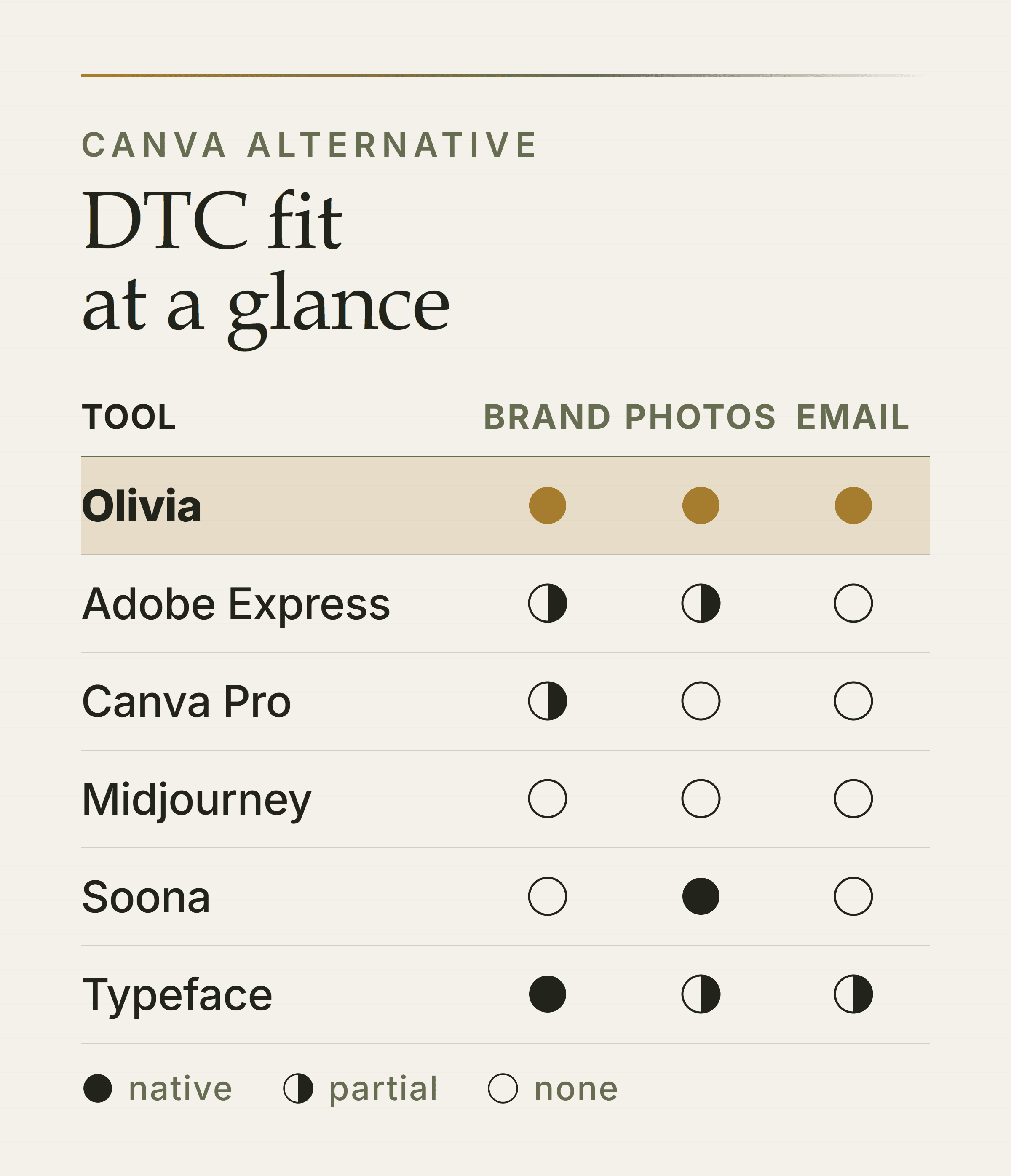
Native, partial or missing on the three criteria that separate DTC tools. The full breakdown follows.
The table below scores all six tools on the five criteria that matter for DTC. Checkmarks indicate native, production-ready capability. Partial credit indicates the feature exists but requires significant manual work or setup.
DTC Ecommerce Design Tool Comparison (2026) — Olivia
Brand Memory: ✓ Persistent
Product Photos: ✓ Native
Ad Export: ✓ Platform-correct
Email/Klaviyo: ✓ Native Klaviyo
Channel Breadth: Photos/Ads/Email/Social/Amazon/Video
Adobe Express
Brand Memory: Partial (brand kit, manual)
Product Photos: Partial (Firefly, manual)
Ad Export: ✓ Resize tool
Email/Klaviyo: ✗ No native export
Channel Breadth: Design/social/video
Canva Pro
Brand Memory: Partial (brand kit, no AI memory)
Product Photos: ✗ Surface-level
Ad Export: Partial (resize only)
Email/Klaviyo: ✗ No native export
Channel Breadth: Design/social/video
Midjourney
Brand Memory: ✗ None
Product Photos: ✗ No product fidelity
Ad Export: ✗ Manual only
Email/Klaviyo: ✗ None
Channel Breadth: Image generation only
Soona
Brand Memory: ✗ None
Product Photos: ✓ Studio + AI
Ad Export: ✗ None
Email/Klaviyo: ✗ None
Channel Breadth: Photography only
Typeface
Brand Memory: ✓ Enterprise hub
Product Photos: Partial (composites)
Ad Export: Partial (agents)
Email/Klaviyo: Partial (agents)
Channel Breadth: Copy/image/video (enterprise)
The pattern is clear. Canva and Adobe Express are strong general design tools — but neither was built for the DTC creative workflow. Olivia is the only option on this list that covers all five criteria natively, end-to-end, in one agent.
The key gap: 'Brand memory' in Canva and Adobe Express means a brand kit you apply manually. In Olivia, it means every output — photos, ads, emails, social posts — inherits your identity automatically, with no re-briefing. That difference compounds across hundreds of assets a month.
How Much Does a Canva Alternative Cost for Ecommerce?
To frame the value of any AI design tool, start with what DTC brands actually spend on the traditional creative stack. The numbers are significant.
Traditional creative stack costs (2026 market rates)
Freelance product photographer: Day rates run $1,500–$5,000 for a mid-range specialist, before studio rental, styling, and post-production editing — a full lifestyle shoot day can reach $3,000–$8,000.
Creative agency retainer: DTC agency retainers run $8,000–$25,000/month in 2026, with most mid-stage brands landing between $10,000 and $18,000.
In-house graphic designer: Average salary of $54,000–$71,000/year in base pay alone — before benefits, tools, and management overhead. A 3-person creative team costs $310,000–$490,000/year.
The AI alternative: A purpose-built AI design agent replaces multiple line items in that stack at a fraction of the cost — Olivia's proof point is ~98% less than agency and freelancer cost per design asset.
Most tools on this list offer a free tier or trial. So the real question isn't the subscription cost — it's whether the tool eliminates the line items above or just adds another one.
For example, a tool that generates product photos but still requires a designer pass, a separate email tool, and manual ad resizing hasn't replaced your stack. It has added to it. That's the test to apply.
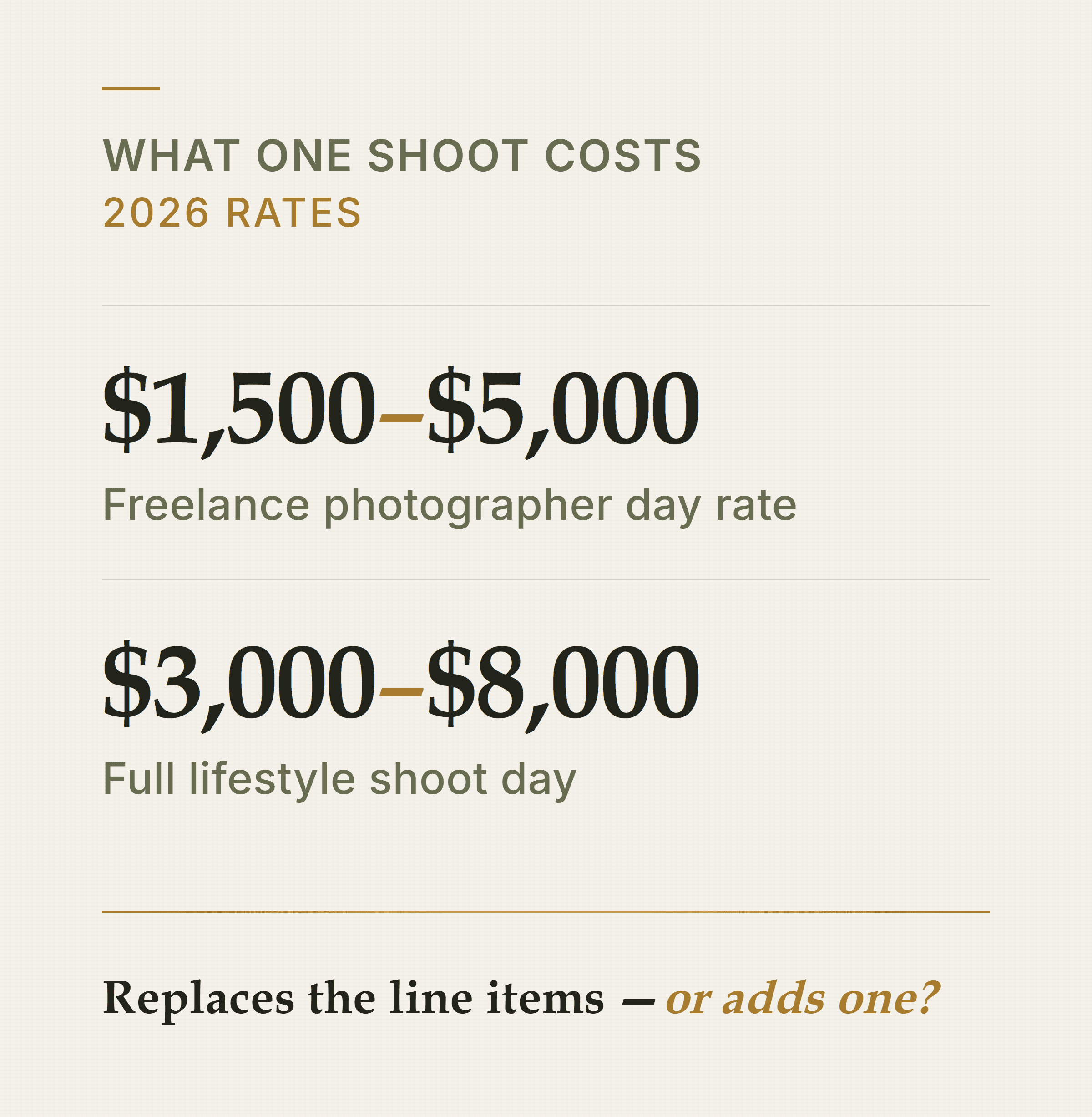
The subscription isn't the cost that matters. The stack it does or doesn't replace is.
Which Canva Alternative Is Right for Your Ecommerce Brand?
Here is the short version. Match your situation to the right tool.
Need the full DTC creative stack — photos, ads, email, social, Amazon — from one tool with persistent brand memory? → Olivia. It is the only option here that covers all five criteria natively.
Already in Adobe Creative Cloud and need a lighter design layer on top? → Adobe Express. The brand kit and Firefly integration are genuinely useful if your team already lives in Photoshop.
Need quick general graphics with no learning curve? → Canva Pro. It is the fastest path to a decent-looking social post — just know you've hit its ceiling if you need product photos or Klaviyo export.
Want product photography with a human photographer's eye on final outputs? → Soona. The hybrid studio-plus-AI model is real, and the quality is solid.
Need raw image generation for creative direction and have a designer to finish the work? → Midjourney. Don't use it for production catalog images.
Running a large enterprise with complex brand compliance and content governance needs? → Typeface. It is not built for a DTC brand under $10M.
If you're not sure where Olivia fits your brand specifically, the fastest way to find out is a free brand audit for your ecommerce funnel — Olivia researches your site, ads, email, and category, then returns a detailed audit of your funnel before you sign up for anything.
Get a Free Audit of Your DTC Creative Funnel Olivia reviews your site, live ads, email flows, and competitive category — and returns a prioritized roadmap of what to fix and what to make next. No signup required to see the output. Start my free audit
Frequently Asked Questions
Is Canva good enough for ecommerce product photos?
Canva is not purpose-built for product photography. Its AI image tools can generate generic lifestyle scenes, but they lack product fidelity — logos, labels, and proportions are often inaccurate. For catalog-scale ecommerce, you need a tool that generates from your actual product image, not from a text prompt. Canva also has no native export to Amazon Seller Central or Klaviyo.
What is the best free Canva alternative for small ecommerce brands?
Adobe Express has the strongest free tier among general design tools, with 100,000+ templates and basic AI features. However, 'free' rarely covers the full DTC workflow — product photography, ad export, and email automation all require paid tiers or separate tools.
Olivia offers a free automated pre-audit of your brand's funnel before you commit to anything, which is a low-risk way to see AI-native output on your actual brand.
Can AI tools replace a graphic designer for a DTC brand?
For high-volume, repeatable creative — product photos, ad variations, email campaigns, social calendars — purpose-built AI design agents now handle ~90% of the output without a designer touch-up.
However, AI tools still benefit from a human creative director setting strategy and reviewing edge cases. The realistic model is AI handling production volume while a designer focuses on brand strategy and creative direction.
Which design tools integrate directly with Klaviyo and Shopify?
Among the tools in this article, only Olivia offers native export directly into Klaviyo and Shopify — finished email flows push into your account without HTML copy-paste or template rebuilding.
Most other tools (Canva, Adobe Express, Midjourney) require you to export a flat image and rebuild the email manually in your ESP. See email design with native Klaviyo export for how Olivia handles this.
What's the difference between a general AI image generator and a DTC design agent?
A general AI image generator (Midjourney, DALL-E, Firefly) takes a text prompt and returns an image — every session starts from scratch, outputs need post-production, and there is no brand memory or channel export.
A DTC design agent like Olivia learns your brand once, generates production-ready creative across every channel (photos, ads, email, social, Amazon, video), and connects to your store data to propose what to make next.
The output difference is roughly 'raw file to fix' versus 'ready to upload.'
How much does it cost to replace a creative agency with an AI design tool?
DTC agency retainers run $8,000–$25,000/month in 2026, with most mid-stage brands paying $10,000–$18,000. A freelance product shoot adds $1,500–$5,000 per session. An in-house designer runs $54,000–$71,000/year in base salary.
Olivia replaces multiple line items in that stack at roughly 98% less cost per design asset — the relevant comparison is not the tool subscription price, but what it eliminates from your existing spend.