
AI-Powered Ad Creative: A Practical Guide for DTC Brands
Key takeaways
AI-powered ad creative is a production workflow, not a prompting exercise — brief quality determines output quality, regardless of tool.
Creative quality now drives roughly 56% of Meta auction outcomes, making volume and freshness a direct ROAS lever, not a nice-to-have.
A mid-size creative agency retainer runs $8,000–$25,000/month; a freelance creative director costs $5,000–$15,000/month — AI production changes the math, not the strategy.
Persistent brand memory — where the tool already knows your identity — is a workflow requirement at 200+ variants/month, not a feature upgrade.
General image generators (Midjourney, ChatGPT) produce raw files; production-ready AI delivers platform-correct assets that go straight to Ads Manager.
AI powered ad creative uses generative AI to produce on-brand, platform-correct ad assets — images, copy, and format — from a plain-language brief. Done right, it cuts production time from days to minutes.
But most teams treat it as a prompting exercise and get raw files that still need a designer. This guide covers the full workflow: brief anatomy, brand consistency at scale, honest tool comparisons, and a testing framework that closes the loop.
What AI powered ad creative actually means (and what it doesn't)
Paid creative is a volume game. Meta attributes roughly 56% of auction outcomes to the creative itself — more than bid strategy or audience targeting combined. So the brand refreshing three ads every six weeks is not losing on targeting; it's losing on creative.
The definition matters here. AI powered ad creative means generative AI that produces a finished, usable ad asset from a brief — not a background-removal tool, not a stock-photo filter, not a chatbot that writes headlines.
In other words, the output is an image, a copy block, or a formatted ad unit ready for Ads Manager.
The line that drives everything in this guide: raw-output AI gives you a file you still have to fix. Production-ready AI, however, gives you a file that goes straight to launch. Most tools today are the former. As a result, the workflow below is built around reaching the latter.
Why DTC brands specifically need a different approach

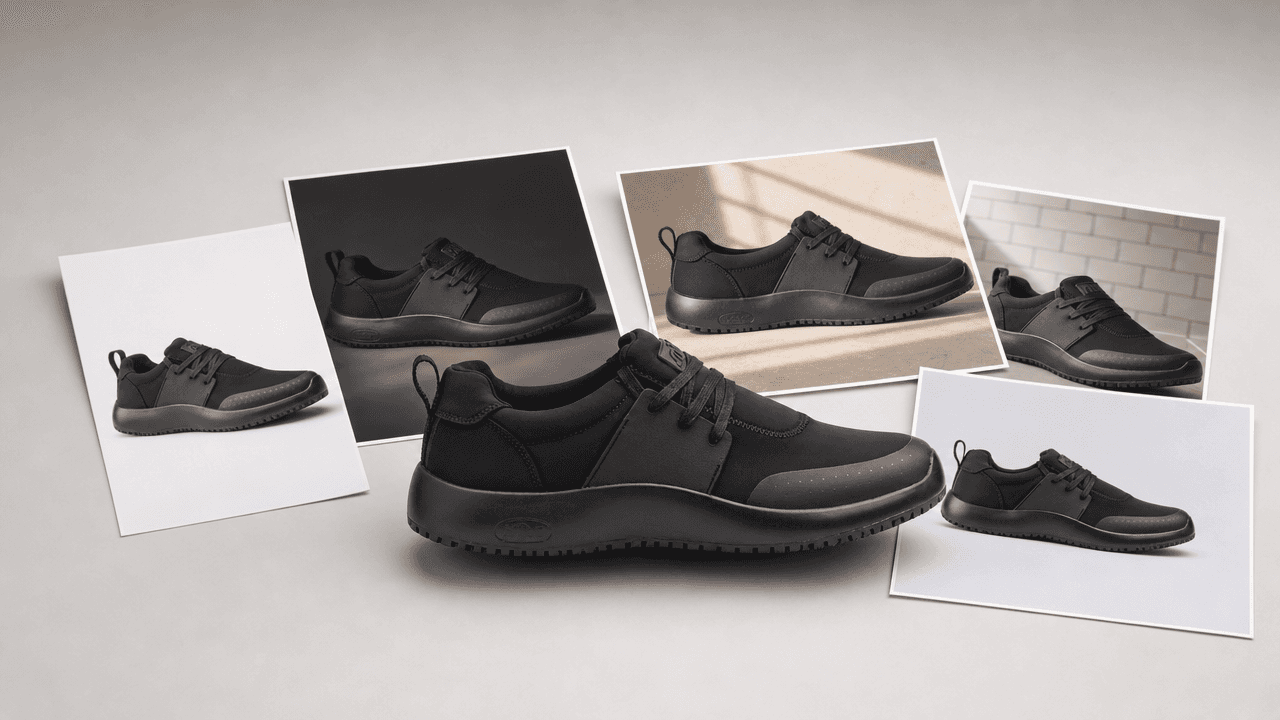
The details general image tools tend to break: stitched seams, a perforated toe cap, a speckled midsole and an embossed logo. A DTC ad is only usable if every one of them survives.
General AI image tools weren't built for physical products. Product accuracy — rendering the text on a label, the stitching on a shoe, the proportions of a bottle — is exactly where they break down. For DTC brands, a blurred label or a warped logo is not a minor flaw; it's an unusable asset.
DTC paid creative also has specific structural demands: platform specs (9:16 for TikTok, 1:1 and 4:5 for Meta feed), brand consistency across hundreds of variants, and the need to test hooks, backgrounds, and copy combinations simultaneously.
For example, a typical DTC brand running Advantage+ Shopping campaigns needs to refresh 10–15 ad variants per active audience segment per month just to hold learning-phase stability.
What traditional creative production costs in 2026 (market-rate estimates)
Creative agency retainer: $8,000–$25,000/month for multi-channel creative support
Freelance creative director: $5,000–$15,000/month on retainer; $100–$150/hr for project work
Product photoshoot: $1,000–$5,000/day for a full studio shoot, not counting post-production
Agency creative cycle: 2–3 weeks per round — most DTC brands need to refresh weekly to avoid ad fatigue
The time constraint is as real as the cost. Creative lifespan on Meta and TikTok has shortened to an average of 4.2 days before fatigue sets in. Because of this, an agency cycle that takes three weeks to deliver a round of creative is structurally incompatible with that refresh cadence.
The anatomy of a strong AI ad creative brief
Vague briefs produce generic output — regardless of the tool. In short, the brief quality ceiling is the output quality ceiling. So before touching any AI powered ad creative tool, get these five inputs locked.
Five-field AI ad brief template — Product reference
What to specify: Hero image or SKU; key visual details
Example (work footwear DTC): Spacecloud 2.0, Eclipse Black, side profile
Audience & pain point
What to specify: Who they are; what problem they have
Example (work footwear DTC): Restaurant workers, 8-hour shifts, foot fatigue
Hook angle
What to specify: Benefit / social proof / problem-solution / seasonal
Example (work footwear DTC): Problem-solution: 'Your feet shouldn't pay for your shift'
Format & placement
What to specify: Platform, aspect ratio, ad unit
Example (work footwear DTC): Meta feed 1:1, TikTok 9:16, Google Display 300×250
Brand constraints
What to specify: Colors, fonts, tone, regulated claims, disclaimers
Example (work footwear DTC): Black/white palette, no medical claims, slip-resistant cert required
Each field earns its place. Without a product reference, the AI invents a product. Without a hook angle, it defaults to a generic benefit statement. Without platform specs, you get an asset in the wrong ratio.
One important note on fields 2 and 5: if your tool has persistent brand memory — it already knows your identity — those fields disappear from every brief after the first. That's not a minor convenience; it's the difference between a 5-minute brief and a 30-minute one at 200 variants a month.
See Where Your Ad Creative Funnel Has Gaps Olivia audits your brand — site, ads, email, reviews, and category — and returns a prioritized creative roadmap. Free, automated, no call required. Get my free audit
Step-by-step: producing AI powered ad creative from brief to launch
The workflow below works with any capable AI creative tool. Follow it in order — skipping steps is where teams lose hours to rework.
Establish your brand inputs. Collect your logo, color palette, typography, photography style, tone of voice, and any compliance rules (regulated claims, required disclaimers). Store these wherever your tool allows — ideally in a persistent brand profile, not a sticky note.
Write the brief. Use the five-field framework above. One brief per campaign angle — not one brief for everything. Specificity here is the single biggest lever on output quality.
Generate at scale. AI's advantage is volume. Brief for 20–50 variants across hook angles and formats in a single session. 'Variants' means the same product with different backgrounds, lighting, and copy combinations — not entirely different concepts.
Review for production readiness. Check product accuracy (text, labels, proportions), brand compliance, and platform spec. Output quality varies significantly by tool — some need a designer pass, some don't.
Export to platform-correct specs. Meta, TikTok, and Google each have specific dimension and file-size requirements. Wrong specs waste the whole session — check before you download.
Launch and feed data back. Winning creative informs the next brief. Note which hook angles and backgrounds performed, then brief the next round against that data — not against what you liked visually.
The step most teams skip is Step 6. They launch, find a winner, and brief the next round from scratch. However, the winning hook angle is the most valuable input you have. Feed it back into the brief explicitly — 'same problem-solution angle, new background, winter context' — and your hit rate compounds over time.
Maintaining brand consistency at volume
The biggest failure mode in AI powered ad creative at scale is drift. Variant 47 looks nothing like variant 1 because the model wasn't anchored to the brand. Colors shift. Font weights change. The tone goes generic. At 20 variants, you catch it in review. At 200, you don't.
Three approaches to brand consistency in AI tools (in order of reliability)
Manual re-briefing every session — fragile, human-error-prone, and doesn't scale past a handful of variants per week
Saved style presets or templates — better, but only covers visual style; doesn't enforce product accuracy or copy tone
Persistent brand model — the tool learns your identity once and applies it to every output automatically; the only approach that holds at 200+ variants/month
A brand running 200 ad variants a month cannot manually re-brief brand colors and font choices 200 times. As a result, persistent brand memory becomes a workflow requirement at that volume, not a nice-to-have feature.
This is where Olivia's Brand DNA feature fits the workflow. You upload your brand kit once — logo, colors, typography, photography style, tone, and compliance rules. Every generation after that inherits your identity automatically, with no re-briefing.
It's the persistent-brand-model approach applied specifically to DTC creative, across every format from AI product photography to ad creative to email.
AI ad creative tools compared: what each one is actually good for
Each tool below is genuinely good at something. However, the question for a DTC brand is whether 'good at something' matches your actual production needs: volume, brand fidelity, product accuracy, and platform-correct export.
AI ad creative tools: DTC-relevant comparison — Olivia
Brand memory: Persistent (learned once)
Product accuracy: ~90% production-ready
Ad platform export: Meta, TikTok, Google — correct specs
Canva
Brand memory: Style presets only
Product accuracy: Template-dependent
Ad platform export: Manual download, no native export
Adobe Firefly/Express
Brand memory: None (session-based)
Product accuracy: Strong, needs skill
Ad platform export: Manual, tool-driven workflow
Midjourney
Brand memory: None (session-based)
Product accuracy: Inconsistent on text/labels
Ad platform export: No ad formats or export
ChatGPT/Gemini
Brand memory: None (session-based)
Product accuracy: Variable, needs cleanup
Ad platform export: No native channel export
Olivia — best for DTC brands running paid creative at volume
Olivia is purpose-built for DTC. Olivia 1.0 is custom-trained on 10,000+ top DTC brands — which is the factual basis for its product-accuracy claim, not a marketing line.
It generates 500+ on-brand ad variations per session, exports to platform-correct specs for Meta, TikTok, and Google, and delivers ~90% production-ready output (Olivia's own benchmark). Honest scope limit: it's not a general graphic design tool.
If you need a brand identity system or a custom illustration, look elsewhere.
Canva — best for general design and template-based social ads
Canva is excellent for teams that need general design flexibility and a low learning curve. Its template library is vast, and the collaboration features are genuinely good. However, it has no persistent DTC brand model, limited product-photo depth, and no native ad-platform export. For high-volume DTC ad production, it becomes a manual bottleneck.
Adobe Firefly/Express — best for design-skilled teams who need image quality
Firefly's image quality is strong, and Express gives it a production layer. But the workflow is tool-driven, not brief-driven — you need design skill to get production-ready output.
Because it's not built for DTC product accuracy at volume, and there's no persistent brand model, teams without a designer in the loop will hit a ceiling quickly. For a team with a designer available, it's a solid image-generation layer.
Midjourney — best for image aesthetics, not ad production
Midjourney produces some of the best-looking AI images available. But it has no brand memory, no product accuracy guarantees, no ad formats, and no export — outputs need a designer to finish before they're usable.
In other words, it's a creative reference tool, not an ad production tool. For DTC brands comparing it to a production workflow, the gap is significant.
ChatGPT/Gemini image generation — best for one-off edits, not volume
Both are capable general image editors. However, every session starts from scratch — no brand memory, no persistent identity. Outputs typically need a post-production pass, and there's no native channel export. For occasional one-off edits, they're useful. For producing 50 on-brand ad variants a week, they're the wrong tool.
The honest comparison: Olivia produces ~90% production-ready output in 3 minutes vs. a 3-week agency cycle — but only for DTC brands running physical-product creative. General design tools like Canva and Firefly cover broader use cases.
So the question is whether your use case is broad or specific. For paid DTC creative at volume, specific wins.
For a broader look at how these and other tools stack up across DTC use cases, see our best generative AI assistants for DTC brands roundup and the best AI image editors for DTC brands comparison.
How to test AI ad creative without wasting spend
Volume is only valuable if you test it systematically. Only 4–8% of creatives become winners across large ad accounts — so you need a structure that finds them without burning budget on noise.
Isolate one variable per test
Test one variable at a time: hook angle, background/scene, or copy. Not all three at once. When you change everything simultaneously, you learn nothing — you simply find a winner you can't replicate. Instead, isolate each element so the data tells you exactly what moved the needle.
Minimum viable creative test (per campaign)
3 hook angles × 2 formats = 6 variants as a starting floor — AI makes this trivial to produce
3–5 creatives per ad set — enough for Meta's algorithm to compare without splitting budget below the learning threshold
Refresh every 7–14 days on TikTok; every 2–3 weeks on Meta — creative lifespan is shortening on both platforms
Track thumb-stop rate alongside CTR — a >30% thumb-stop rate is the signal your hook is working before conversion data arrives
Read results back into the next brief
CTR tells you about the hook. Conversion rate, however, tells you about the landing page match. Feed the winning hook angle into the next brief explicitly — not just the winning image. The creative that converts is the brief for the next round.
For teams who want to close this loop automatically: Olivia's Briefs feature reads your connected store and channel data (Shopify, Meta, Google Ads, Klaviyo) and proposes the next creative brief pre-specced — audience, angle, format, and copy direction already written.
You review and hit go. As a result, it turns the test-learn-brief cycle from a manual task into a recurring system.
Agencies managing paid creative for multiple DTC clients can apply this same framework across accounts. See Olivia for performance agencies for how the workflow scales across a client roster.
Frequently asked questions
Is AI-generated ad creative allowed on Meta, TikTok, and Google Ads?
Yes — all three platforms permit AI-generated ad creative, provided it complies with their standard advertising policies. Meta, TikTok, and Google do not prohibit AI-generated images or copy. However, they do require disclosure for certain synthetic media (particularly realistic AI-generated video of real people). Standard product and lifestyle ad creative generated by AI tools raises no platform policy issues.
How do I keep AI-generated ads on-brand when I'm producing hundreds of variants?
The only reliable method at scale is a persistent brand model — a tool that has learned your identity once and applies it automatically to every output. Manual re-briefing and saved style presets both break down above 50–100 variants per month. At 200+ variants, persistent brand memory is a workflow requirement, not a feature upgrade.
Do I still need a graphic designer if I use an AI ad creative tool?
It depends on the tool. General image generators (Midjourney, ChatGPT) produce raw files that typically need a designer to finish.
Production-ready AI tools, however, aim to deliver assets that go straight to Ads Manager — Olivia benchmarks ~90% of outputs as requiring no designer touch-up.
For DTC brands running high-volume paid creative, the designer's role shifts from production to strategy and creative direction.
How accurate is AI at rendering product labels, packaging text, and fine details?
Accuracy varies significantly by tool. General image models (Midjourney, Stable Diffusion) are notoriously inconsistent on text and fine product details — labels blur, text garbles, and proportions shift. DTC-specific tools trained on product photography perform substantially better.
For example, Olivia benchmarks ~90% production-ready accuracy on text, sizing, and product details, because Olivia 1.0 was trained specifically on 10,000+ DTC brand assets rather than general image data.
What's the difference between an AI ad creative tool and a general image generator like Midjourney?
A general image generator produces a raw image from a prompt — no brand memory, no ad formats, no platform export.
An AI ad creative tool, by contrast, is a production workflow: it takes a brief, applies your brand identity, generates platform-correct ad units across multiple formats, and delivers files ready for Ads Manager.
In short, Midjourney is a creative reference tool, while an AI ad creative tool is a full production system.
How many ad variants should I be testing per campaign?
Start with at least 3 hook angles × 2 formats = 6 variants per campaign as a floor. Meta recommends 3–5 creatives per ad set to give the algorithm enough signal without splitting budget too thin.
TikTok rewards higher volume — 10–20 variants minimum to find winners. At scale, brands maintaining 4.0+ ROAS typically introduce 200+ new creatives per month across their accounts.
Find the Gaps in Your Current Ad Creative Funnel Olivia reviews your live ads, email, store performance, and brand positioning — then returns a detailed pre-audit with prioritized creative recommendations. Free and automated. Start my free audit