Amazon Listing Images: What to Make, How to Make Them
Key takeaways
Amazon allows up to 9 images per listing — but most brands waste 4–5 slots on duplicate angles instead of giving each slot a distinct conversion job.
Over 60% of Amazon traffic now comes from mobile, where only the first 3–4 images show before a scroll — your opening sequence has to work without the rest.
A traditional product photoshoot runs $500–$3,000+ per day and 2–4 weeks to final files; AI-generated listing sets can be production-ready in under an hour.
AI-generated images are fully allowed on Amazon — the only 2026 rule change requires metadata tagging when images contain photorealistic AI-generated people.
Amazon Brand Registry enrollment is a hard prerequisite for A+ Content — if you're not enrolled, that's the first step, not the last.
Amazon listing images are the closest thing to a physical shelf experience your product gets. You have up to 9 slots. Each one has a specific job.
Together, they replace the ability to pick up, inspect, and compare a product in a store — and they directly drive the click-through rate and conversion rate signals Amazon's algorithm uses to rank you.
Most guides tell you which slots to fill. This one tells you what each slot must communicate, what Amazon's rules actually require, and how to produce all nine images — with or without a photoshoot or a designer.
What Amazon listing images actually do (and why most brands get them wrong)
Amazon lets you upload up to 9 images per listing: one main image plus up to 8 secondary slots. Each slot has a distinct conversion job. Together, they have to do what a store shelf does — show scale, texture, features, and context — in a few seconds of scrolling.
Mobile makes this harder. Over 60% of Amazon traffic now comes from mobile devices, and on a phone, only the first 3–4 images display before a scroll. So your opening sequence carries most of the weight.
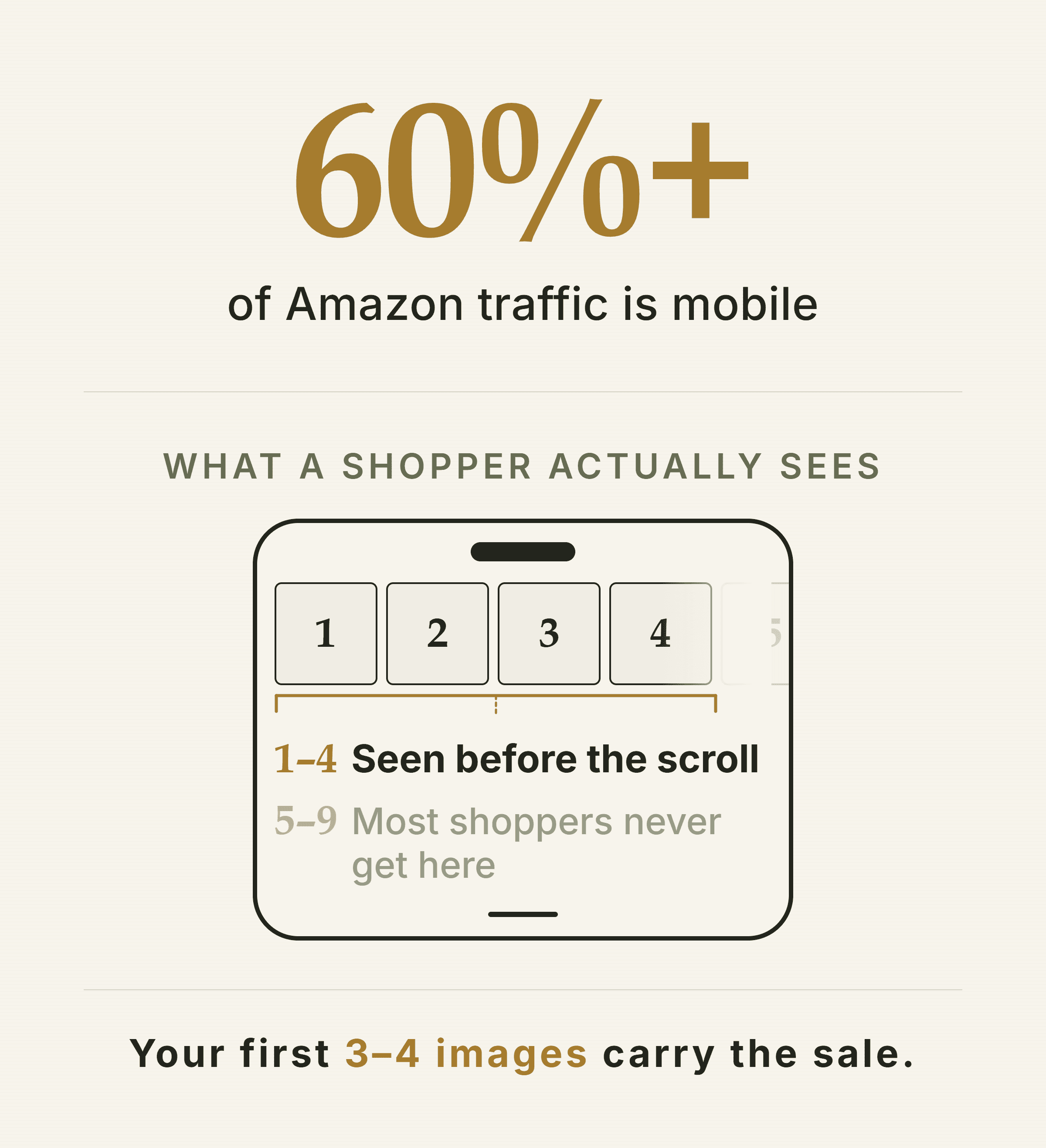
On a phone, slots 1–4 do most of the selling. Everything after them is a bonus.
The two mistakes that kill most listings
Treating every slot as a duplicate product shot. A second and third white-background angle wastes the slots that should answer objections, show scale, and build trust.
Ignoring the mobile scroll test. If your first three images don't tell a complete story, you've lost the majority of your traffic before they read a word.
Images affect your ranking, not just your conversion rate. Amazon's algorithm uses click-through rate and conversion rate as ranking signals. Weak images suppress both — so a bad image set doesn't just lose the sale, it buries the listing.
Amazon's image requirements: the rules you can't ignore
Amazon's image rules are strict and category-specific. The main image rules are the non-negotiables. Check Amazon Seller Central for your category's style guide before uploading — rules do change, and category-specific requirements override the defaults.
Requirement | Spec |
|---|---|
Background | Pure white — RGB 255, 255, 255 |
Product fill | 85%+ of the frame |
Text / logos | None — no watermarks, badges, or overlays |
Minimum size | 1,000px longest side (zoom-eligible) |
Recommended size | 2,000px+ longest side |
Max file size | 10 MB per image |
Accepted formats | JPEG, PNG, TIFF, GIF (no animated) |
Secondary images (slots 2–9) have more flexibility. White or lifestyle backgrounds are both allowed. Text overlays and infographics are permitted. However, the product must still accurately represent what the buyer receives.
One new rule for 2026: Amazon now requires sellers to tag product images containing photorealistic AI-generated people with specific metadata before upload. AI-generated product images without people are fully allowed — the rule targets synthetic human likenesses only, not AI-generated backgrounds, scenes, or product renders.
The 9-slot framework: what each image must communicate
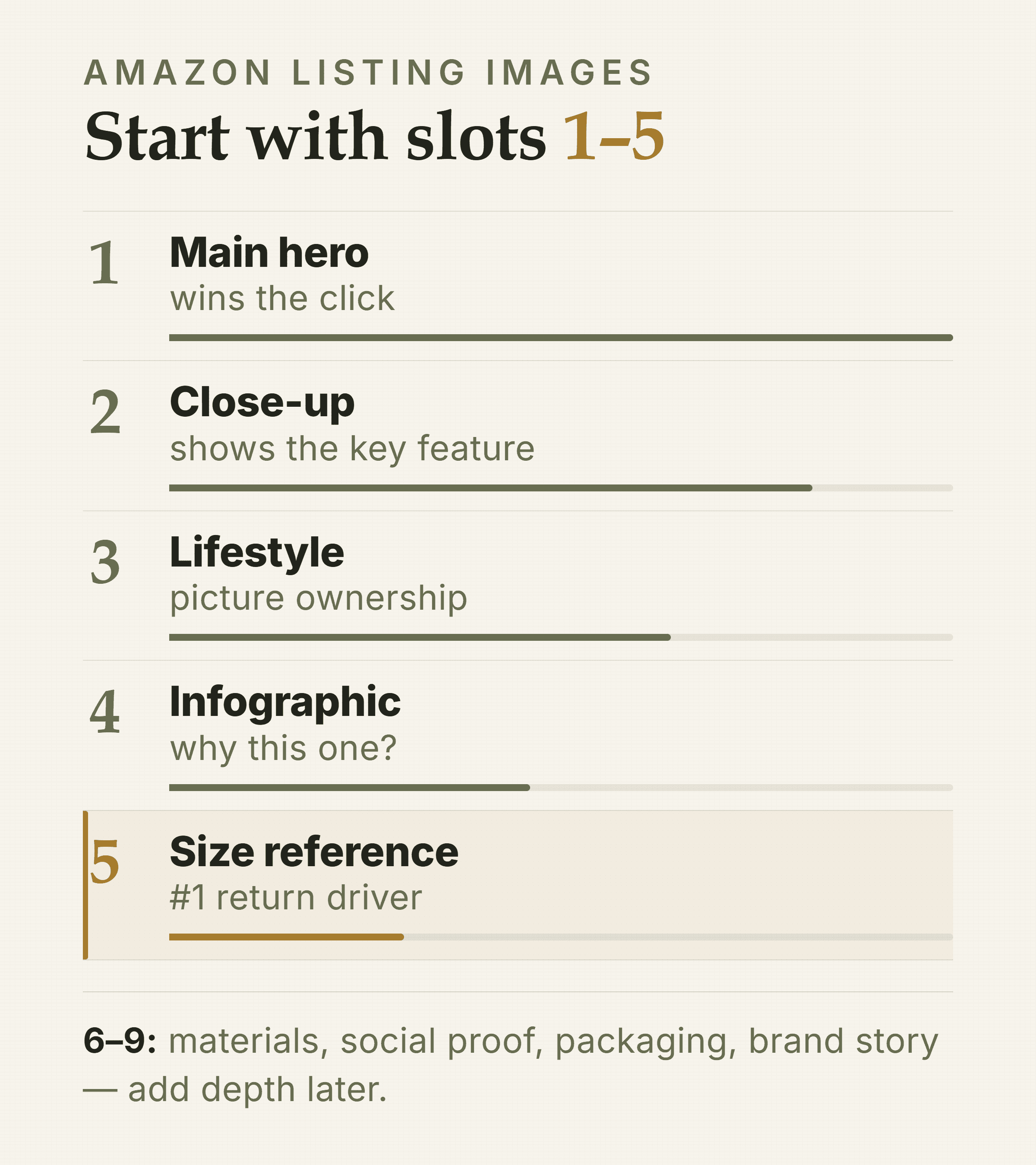
The core five. Slot 5 is the one most brands skip and pay for in returns.
Not every product needs all 9 slots. But every slot you use should earn its place. Here's the conversion job for each one — map your own product against this before you brief a photographer or an AI tool.
9-slot conversion job map — 1
Name: Main hero
Conversion job: Drive click-through in search — white bg, product only, fills 85%+ of frame
2
Name: Second angle / close-up
Conversion job: Show what the main image can't — key feature, texture, or back panel
3
Name: Lifestyle / in-use
Conversion job: Help the buyer picture ownership — product in context, real setting
4
Name: Infographic
Conversion job: Answer 'why this one?' — top 3–5 features with short callout labels
5
Name: Size / scale reference
Conversion job: Eliminate the #1 return driver — ruler, hand, or comparison object
6
Name: Ingredients / materials / certs
Conversion job: Build trust in what's inside — critical for supplements, food, beauty, apparel
7
Name: Social proof / comparison
Conversion job: Reduce risk — star ratings, press mentions, or a factual comparison chart
8
Name: Packaging shot
Conversion job: Set unboxing expectations — important for gifting and premium categories
9
Name: Brand story / 'why us'
Conversion job: Reinforce identity — short, visual, optional but high-value for brand recall
Start with slots 1–5. Those five images cover click-through, feature education, context, objection-handling, and the single biggest return driver (wrong size expectations). Slots 6–9 add depth — but only after the first five are solid.
Slot 5 — the size reference — is underused and expensive to skip. Research consistently shows that 'not as described' and 'wrong size' together drive the majority of returns in visual categories. A single image with a hand, ruler, or common object next to the product eliminates most of that ambiguity.
See What Your Amazon Creative Is Missing Olivia audits your full DTC funnel — including your Amazon listing images — and returns a detailed breakdown of gaps and what to make next. Get my free audit
How to produce your listing images: three real approaches
There's no single right answer here. The best production path depends on your stage, your catalog size, and how fast you need to iterate. Here's an honest look at all three.
Production path comparison — Traditional photoshoot
Typical cost: $500–$3,000+/day (photographer) + studio + retouching
Timeline: 2–4 weeks
DIY smartphone
Typical cost: Near-zero in tools; high time per SKU
Timeline: Days to weeks per set
AI-generated
Typical cost: Fraction of studio cost
Timeline: Under 1 hour for a full 9-image set
Option 1: Traditional product photoshoot
A traditional shoot means hiring a photographer, booking a studio or location, prepping samples, shooting, retouching, and exporting. Photographer day rates in 2026 run $500–$3,000 for a mid-range specialist, with studio rental adding $200–$500 per day on top.
When it makes sense — and when it doesn't
Best for: hero brand campaigns, high-end lifestyle imagery, categories where authentic UGC-style photography is a strong conversion signal (apparel, food, beauty).
Limitation: expensive and slow to iterate — every new colorway, seasonal refresh, or A/B test requires a new shoot booking.
Timeline: 2–4 weeks from booking to final files is typical; rush fees apply if you need faster.
Option 2: DIY with a smartphone and editing tools
Shoot on a lightbox or white sweep at home, edit in Lightroom or Photoshop, and use a background-removal tool for the main image. Cost is near zero in tools, but the time investment per SKU is real.
Honest assessment
Good enough for: main image and secondary angles on simple products — especially for early-stage sellers validating a product before investing in professional creative.
Harder to produce: polished infographics, lifestyle composites, and consistent brand look across a catalog without design skills.
The gap: infographics and lifestyle shots still require design work — DIY rarely covers the full 9-slot set at a production-ready standard.
Option 3: AI-generated listing images
The AI workflow is: upload one product image, brief the AI on angle, lighting, and scene, and receive production-ready outputs in minutes. For a full 9-image set, that's under an hour — compared to 2–4 weeks via a traditional shoot.
AI handles white-background hero shots, angle variations, lighting presets, background swaps, lifestyle composites, and infographic layouts well. However, highly tactile or transparent materials — glass, liquids, sheer fabrics — can still trip up current models. Always QA text accuracy on infographic overlays carefully.
General AI tools like Midjourney or ChatGPT image generation produce a raw file that needs a designer pass. They don't know Amazon's spec requirements, and every session starts from scratch — no brand memory, no spec-aware export.
For a one-off image, that's fine. For a full listing set that has to stay on-brand across 9 slots and export at Amazon Seller Central specs, it's a significant gap.
Olivia's AI product photography generates multiple angles and 12 lighting presets from a single upload, with ~90% of outputs production-ready without a designer pass.
Its Amazon listing and A+ content design feature is trained on 10,000+ top-selling listings and exports files in the exact specs Amazon Seller Central requires — listing images, A+ Basic/Premium content, and brand store assets, all in one brief.
The persistent Brand DNA is the specific advantage for a full listing set: your colors, typography, and visual style are learned once and applied to every image automatically. So slot 3's lifestyle composite and slot 4's infographic look like they came from the same brand — because they did.
Step-by-step: building a full 9-image set with AI
This workflow works with any AI image tool. Where Olivia removes a specific friction point, that's noted. Follow the steps in order — each one builds on the last.
Prep your source image. Shoot or source one clean, well-lit photo of your product on any background. You need one good source image — AI handles the rest.
Generate your main image (slot 1). Brief for a pure white background (RGB 255, 255, 255), product centered, filling 85%+ of the frame. QA: zoom in on text and edges; resubmit if product details are off.
Generate angle variations and close-ups (slots 2–3). Brief for a 3/4 angle, top-down, and any feature close-up relevant to your product. Be specific about which feature to highlight.
Generate a lifestyle composite (slot 3). Brief the scene precisely — who is using it, where, what emotion. 'Woman in a modern kitchen using the product on a marble countertop' beats 'lifestyle shot'.
Build your infographic (slot 4). List your top 5 features in plain language before you brief. The AI needs your copy; it handles the layout. QA every text element carefully — this is where errors appear most.
Add a size/scale image (slot 5). Brief with a specific reference object or dimension callout. This is the single highest-ROI image for reducing returns.
Fill slots 6–9 based on your category. Ingredients or certifications (slot 6), social proof or comparison (slot 7), packaging (slot 8), brand story (slot 9). Not every product needs all four.
Export to Amazon specs. Download at 2,000px+ on the longest side, JPEG, under 10 MB. If using Olivia's Amazon Design export, spec compliance is handled automatically.
QA the full set on mobile. Load your listing on a phone and check that the first 3 images tell a complete story without scrolling.
Brand Registry is required before A+ Content is available. If you're not enrolled, that's your first step — not an afterthought. Enrollment requires a registered trademark. Start the process early; it typically takes a few weeks to clear.
A+ Content: when to add it and what it needs
A+ Content is the enhanced brand content section below the fold on your product detail page. It replaces the plain text product description with image-rich modules — comparison charts, lifestyle imagery, feature callouts, and brand story blocks.
Amazon's own data puts the average conversion lift from A+ Content at up to 8%. Well-executed A+ pages can do better — but treat it as a measurement problem and track results per SKU rather than assuming a fixed lift.
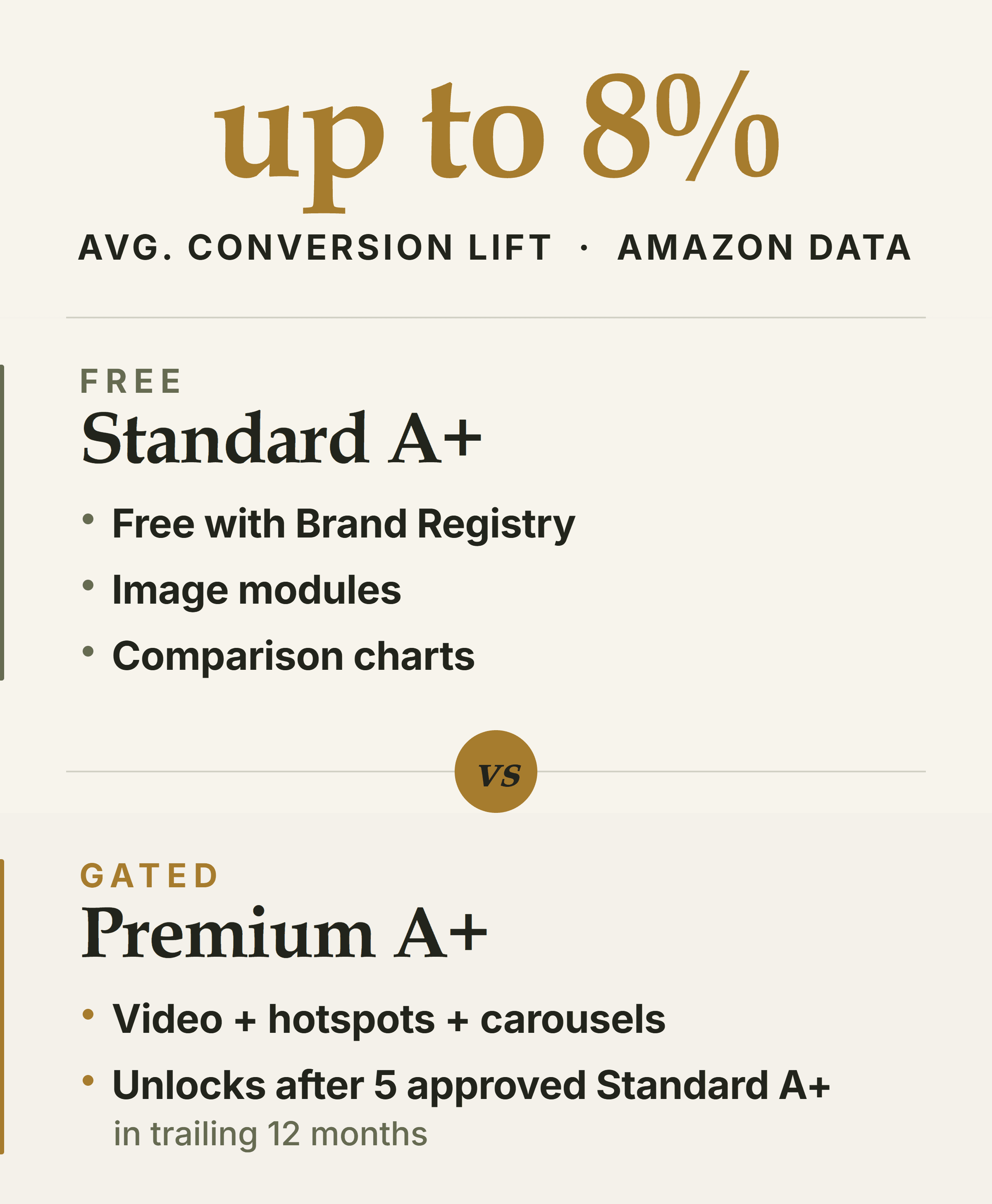
Standard is free once you're brand-registered. Premium has to be earned with five approved Standard pages.
Standard A+ vs. Premium A+
Standard A+ (Basic): Free for all Brand Registry sellers. Adds image modules, comparison charts, and formatted text below the listing.
Premium A+: Unlocks video modules, interactive hotspots, and carousel content. Requires 5 approved Standard A+ submissions in the trailing 12 months — not invite-only, but gated by activity.
What A+ Content needs: a consistent visual narrative across 5–7 modules. It should extend the listing images, not repeat them.
Olivia's Amazon listing and A+ content design produces A+ Basic and Premium content in Amazon-approved formats, trained on 10,000+ top-selling listings. Because it works from your Brand DNA, the A+ modules match the visual language of your listing images automatically.
Frequently asked questions about Amazon listing images
How many images should an Amazon listing have?
Amazon allows up to 9 images per listing (1 main + up to 8 secondary). Amazon recommends at least 6 images plus one video. In practice, prioritize slots 1–5 first — those cover the conversion jobs that matter most — then fill 6–9 based on your category and product complexity.
What are Amazon's main image requirements for 2026?
The main image must have a pure white background (RGB 255, 255, 255), with the product filling at least 85% of the frame. No text, logos, watermarks, or props are allowed.
Minimum size is 1,000px on the longest side; 2,000px+ is recommended to enable zoom. File size must be under 10 MB. Accepted formats are JPEG, PNG, TIFF, and non-animated GIF.
Can you use AI-generated images on Amazon listings?
Yes — Amazon permits AI-generated product images as long as they accurately represent the physical product and meet standard image requirements. The only 2026 rule change: images containing photorealistic AI-generated people must be tagged with specific metadata before upload. AI-generated backgrounds, scenes, and product renders without people require no disclosure.
What size and resolution do Amazon listing images need to be?
Minimum 1,000px on the longest side (required for zoom to activate). The recommended sweet spot is 2,000–3,000px. Maximum is 10,000px. File size must stay under 10 MB. JPEG is the preferred format; sRGB color mode is recommended.
How do I get A+ Content on Amazon?
You need a Professional selling account and a brand enrolled in Amazon Brand Registry — that's the hard prerequisite. Once enrolled, Standard A+ Content is free and available immediately. Premium A+ requires 5 approved Standard submissions in the trailing 12 months. Build your listing images first; A+ Content amplifies a strong listing but doesn't rescue a weak one.
How often should I update my Amazon listing images?
Update when your conversion rate drops without a price or ranking change, when you launch a new colorway or variant, when seasonal context would help (holiday gifting, summer use), or when return data shows a pattern of 'not as described' or 'wrong size' complaints. There's no fixed schedule — let your data drive it.
What to do next with your Amazon creative
You now have the framework: 9 slots, each with a specific job. You have the rules. And you have three production paths with honest tradeoffs. The next question is: which of your current listing images are actually working?
For a broader read on your DTC funnel — including your Amazon creative, your ad performance, and your email gaps — Olivia's free pre-audit is a useful starting point.
It researches your brand automatically and returns a detailed breakdown of what's working and what to fix.
See also: best generative AI assistants for DTC brands in 2026 for a broader tool comparison, and best AI image editors for DTC brands if you're evaluating editing tools specifically.
Get a Free Audit of Your Amazon Creative Answer 7 questions and Olivia researches your brand — listing images, ad creative, email, and funnel gaps — and returns a detailed breakdown of what to fix and what to make next. Start my free audit