9 Best AI Design Tools for DTC Brands (2026)

The best AI design tool for DTC brands depends on one question most roundups skip: can it handle a product photo, an email flow, and an Amazon listing from the same brand kit — without starting over each session? The short answer: most can't. Olivia is the only purpose-built DTC AI design agent covering the full creative stack. Canva wins on general templates and team collaboration. Midjourney leads on raw image quality. This list ranks all nine on the criteria that actually matter for operators selling physical products.
How We Evaluated Each AI Design Tool
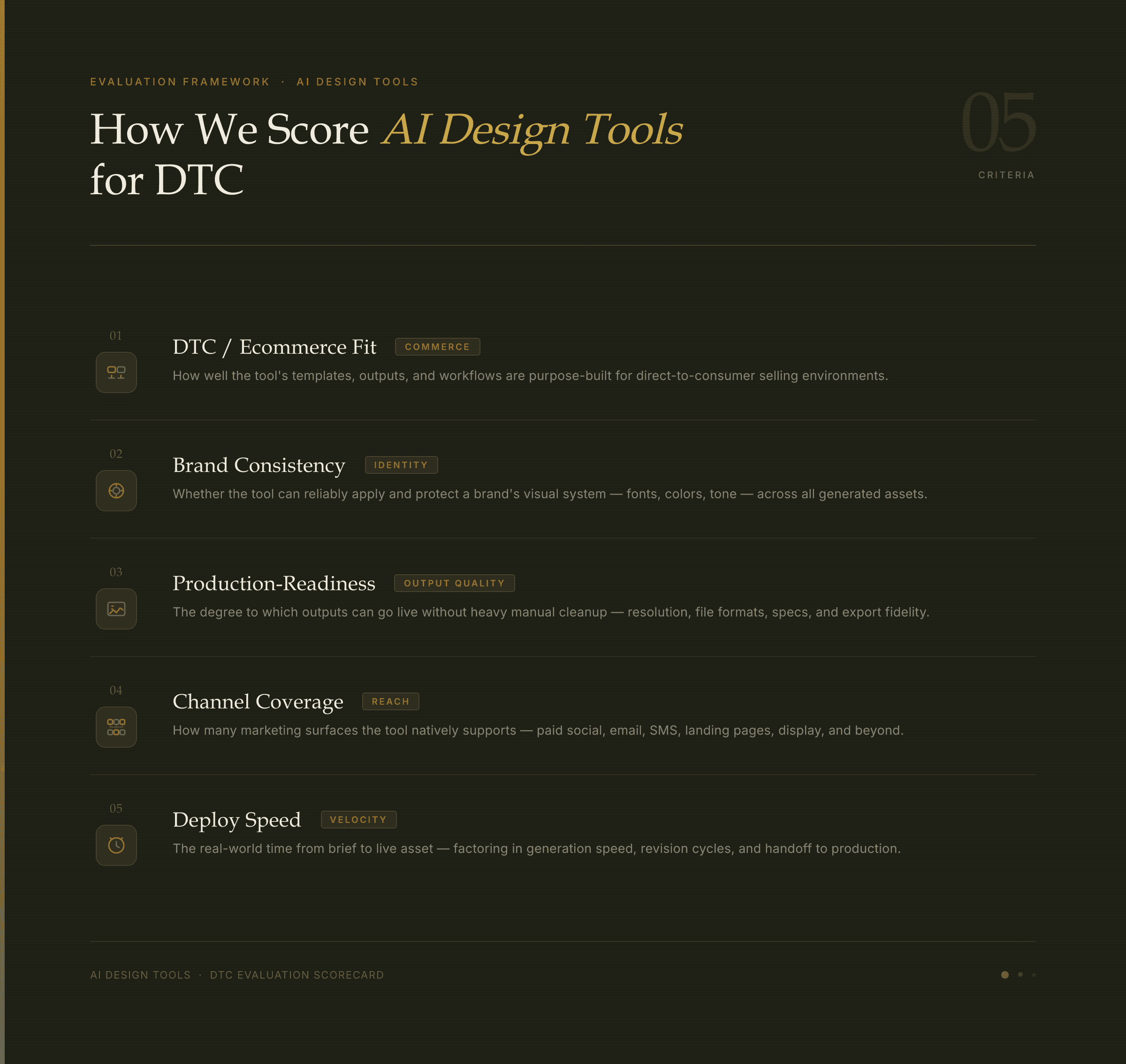
These five criteria separate tools built for DTC operators from tools built for general creatives.
Most 'best AI design tools' lists are built for general creatives. They rank Canva and Midjourney without asking whether the tool can handle a product photo, an email flow, and an Amazon listing from the same brand kit. This list, however, weights DTC-specific use cases — because 'best for general design' and 'best for a physical-product brand' are often very different answers. To that end, every tool below is scored against the same five criteria.
Scoring criteria
DTC/ecommerce fit — does it handle product photography and channel-specific formats natively?
Brand consistency — does it remember your brand kit across sessions, or do you re-brief every time?
Production-readiness — how much designer cleanup does the output need before it can go live?
Channel coverage — photos, ads, email, social, pages, Amazon, video — or just one format?
Deploy speed — does it push directly to Shopify, Klaviyo, or Amazon, or does it just export a file?
1. Olivia — Best All-in-One AI Design Tool for DTC Brands
Olivia is a conversational AI design tool built exclusively for DTC brands. Brief it in plain language — the way you'd brief a designer — and it returns production-ready product photos, ad creative, email flows, social content, landing pages, Amazon listings, and video. Importantly, no prompting expertise is required.
The core differentiator is how Olivia learns your Brand DNA. Upload your logo, colors, typography, photography style, and tone once. After that, every output — across every channel, every session — inherits that identity automatically. As a result, there's no re-briefing and no drift.
~90% of Olivia outputs are production-ready with no designer touch-up. Assets in 3 minutes vs. 3 weeks. Cost: ~$250–$1,000/mo vs. $115K–$302K+/yr for an equivalent agency and freelancer stack.
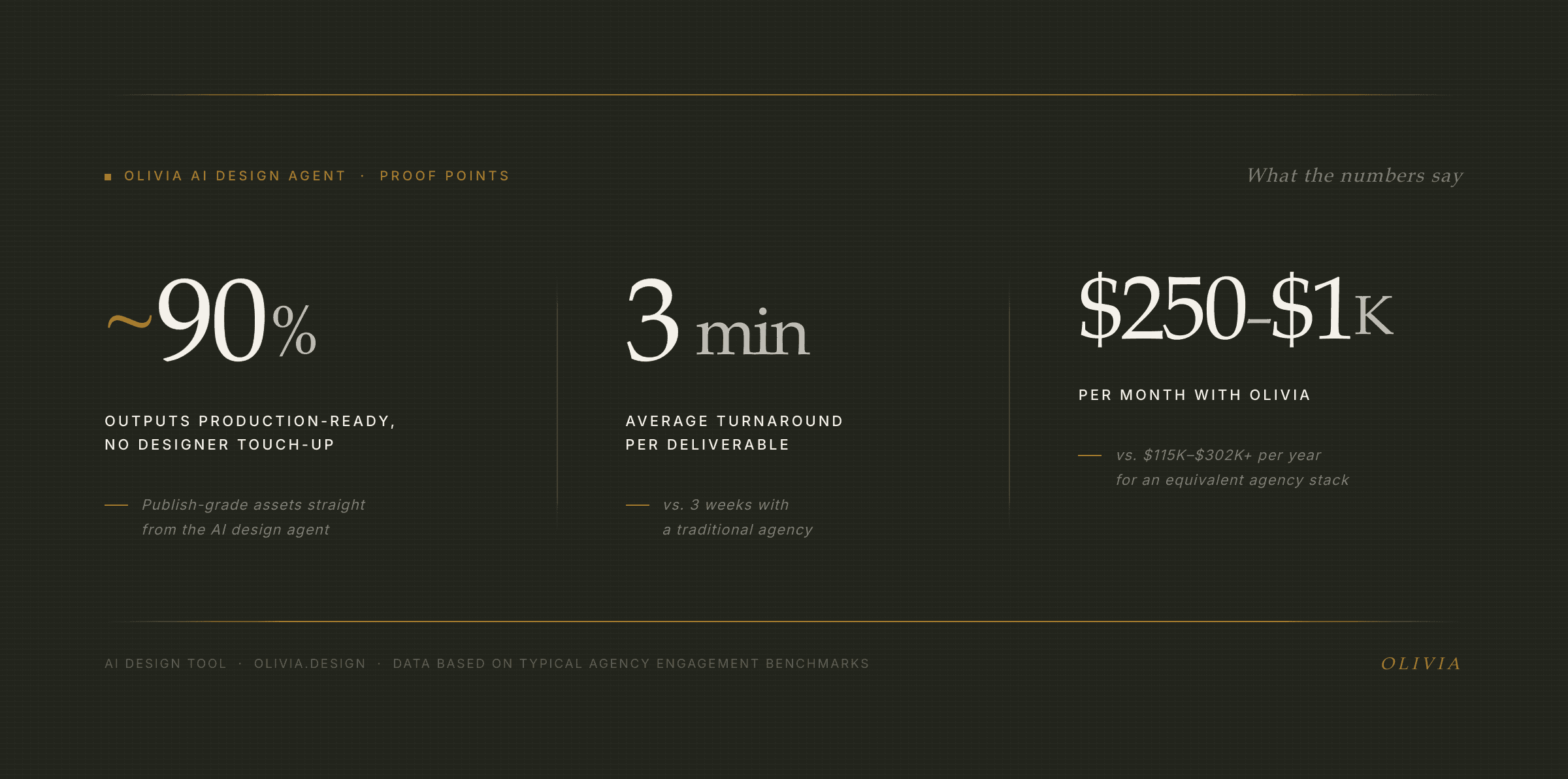
Three numbers that explain why DTC brands are switching from agencies to Olivia.
Olivia 1.0 is custom-trained on 10,000+ top DTC brands — not a general image model repurposed for ecommerce. That training is why outputs land closer to production-ready: the model already knows what converts for physical-product brands. Furthermore, it's backed by Google for Startups, AWS Activate, and the NVIDIA Inception Program.
What makes Olivia different from every other AI design tool on this list
AI product photography — studio-quality shots from a single upload, any angle, 12 lighting presets, any background, production-ready.
One-click deploy to Shopify, Klaviyo, and Amazon Seller Central — not just file export. Platform-correct sizing for Meta, TikTok, and Google included.
Data-connected Briefs — Olivia reads your store and channel performance data and surfaces on-brand campaign ideas grounded in what's actually selling.
AI email and newsletter design — complete flows and A/B variants with one-click Klaviyo deploy.
Olivia is purpose-built for DTC physical-product brands and the agencies that serve them. It is not a general graphic design tool. If you need a presentation template or a wedding invitation, Canva is a better fit. If, on the other hand, you're running a Shopify store and need on-brand creative across every channel without rebuilding your brand kit every session, Olivia is the fastest path.
Access is currently invite-only, with a 300+ brand waitlist — a signal of demand, not a hard barrier. Join the Olivia waitlist to request access.
2. Canva — Best for General Templates and Team Collaboration
Canva is the most accessible design platform on the market. Its template library spans thousands of formats, and the drag-and-drop editor is genuinely intuitive for non-designers. Canva now serves 230+ million monthly active users, which speaks to how well it removes the friction of everyday content creation.
Magic Studio — Canva's AI suite — includes text-to-image, background removal, Magic Resize, and a Brand Kit that auto-applies your colors and fonts to templates. For quick social graphics and presentations, it's a genuine productivity multiplier.
The DTC gap: Canva's Brand Kit applies your colors and fonts to templates — but it doesn't learn your photography style, generate product shots, or deploy to Shopify and Amazon. Every session starts from the same template library.
Best for: Small teams and solopreneurs who need fast, general-purpose design — social graphics, presentations, and lightweight marketing materials — and don't require deep product photography or ecommerce channel integration. See how it compares directly in Olivia vs. Canva.
3. Adobe Firefly / Express — Best for Creative Professionals in the Adobe Ecosystem
Adobe Firefly is a powerful generative image and vector model with strong commercial licensing — Adobe processes over 1 billion generated images monthly as of early 2026. Its deep integration into Photoshop, Illustrator, and Premiere makes it a natural fit for designers already living in Creative Cloud.
Adobe Express brings a simpler, template-driven interface for non-designers. However, the workflow is tool-driven — you operate the software rather than describe what you want. There's no persistent DTC brand model, and Firefly's Generative Fill can shift product details during scene generation — colors drift, logos get garbled — which matters for product accuracy.
Best for: In-house designers and agencies who already live in Adobe Creative Cloud and want AI assistance layered into an existing professional workflow. Not a brief-driven DTC agent — you bring the design skills.
4. Midjourney — Best for High-Quality Conceptual Image Generation
Midjourney produces some of the most aesthetically impressive AI images available. For mood boards, campaign concepts, and lifestyle imagery, it's genuinely hard to beat. Indeed, the output quality at its best is editorial-grade.
For DTC production use, however, the gaps are real. Midjourney has no built-in consistency mechanism — each generation is independent. Product details drift: logos melt, labels shift, materials warp. Consequently, getting consistent, on-brand results requires disciplined prompt engineering — a real time cost for operators who aren't prompt engineers.
Best for: Creative directors who want inspiration imagery, concept exploration, or editorial lifestyle shots — not production-ready DTC assets at scale. For a direct comparison, see Olivia vs. Midjourney.
5. Soona — Best for Human-Reviewed Product Photography
Soona blends AI editing with a studio and UGC model — you get real product shots reviewed by humans. With an average spend of $750 and a 24-hour turnaround, it's a fast, affordable alternative to a traditional studio shoot. Human quality control is the genuine differentiator.
The limitation is scope. Soona is a single-format platform — photography and UGC — with no coverage of ads, email, landing pages, or Amazon listing design. Turnaround is faster than a traditional agency but slower than instant AI generation. Consequently, for a full DTC creative stack, you'd still need additional tools alongside it.
Best for: Brands that prioritize human-reviewed photography and are comfortable with a narrower, single-format workflow. See the full breakdown in Olivia vs. Soona.
6. Typeface — Best for Enterprise Brand Content at Scale
Typeface is an enterprise AI content platform built for large marketing teams. It learns brand voice and visual identity and applies them across content types — copy, images, and video. Founded by the former CTO of Adobe, it has raised over $165 million and counts Google Cloud and Salesforce among its partners.
The DTC gap is fit and price. Typeface is enterprise-only with no public self-serve tier — deployments typically run $100K–$1M+/year. It's built for Fortune 500 marketing teams, not a Shopify brand doing $2M in revenue. Moreover, product photography depth and Amazon listing design are not core to the platform.
Best for: Enterprise marketing teams that need brand-consistent content at scale across many stakeholders, with the budget and implementation timeline to match.
7. ChatGPT (GPT-4o / DALL·E) — Best for Versatile Text-and-Image Tasks
ChatGPT with GPT-4o image generation is the most widely accessible AI creative tool available. It handles copy, images, and ideation in one interface — useful for quick mockups, ad copy drafts, and concept exploration. Overall, the breadth of tasks it covers is genuinely impressive.
For DTC production use, however, the core problem is memory. Every session starts from scratch — there's no persistent brand model. As a result, image output typically needs a designer pass before it's production-ready for a physical-product brand. Additionally, there's no ecommerce channel deploy. For a direct comparison, see Olivia vs. ChatGPT / DALL·E.
Best for: Operators who need a general-purpose AI assistant for a wide range of tasks and don't require brand-consistent, production-ready creative at volume.
8. Gemini (Google) — Best for Google Ecosystem Integration
Google Gemini offers strong image generation and editing capabilities, with deep integration into Google Workspace and Google Ads. For brands running Google-heavy ad programs, the workflow integration is a real advantage — creative assets and campaign management sit in one ecosystem.
Like ChatGPT, Gemini has no persistent brand model — each session starts fresh. As a result, output needs post-production cleanup before it's DTC production-ready. There's also no native Shopify, Klaviyo, or Amazon deploy. Best for: Brands heavily invested in the Google ecosystem who want AI-assisted creative within Google's tooling.
9. Looka / Brandmark — Best for Brand Identity Starting Points
AI logo and brand identity generators like Looka and Brandmark are useful for early-stage brands that need a starting brand kit quickly. Looka has served over 20 million people across 188 countries — a sign of how much demand exists for affordable, fast brand identity creation. Logos start at $20 for a basic PNG.
These are identity-generation tools, not ongoing creative production tools. In other words, they don't produce ads, emails, product photos, or pages. Once you have your brand kit, you'll need a different tool for everything else. Best for: Pre-launch or early-stage brands that need a logo and basic brand assets before they have a full creative workflow.
Side-by-Side Comparison: AI Design Tools for DTC Brands
Tool | DTC-Trained | Persistent Brand Memory | Product Photography | Multi-Channel Coverage | One-Click Deploy | Best For |
|---|---|---|---|---|---|---|
Olivia | ✅ Yes (10K+ DTC brands) | ✅ Yes — Brand DNA | ✅ Studio-quality, instant | ✅ Photos, ads, email, social, pages, Amazon, video | ✅ Shopify, Klaviyo, Amazon | DTC brands & agencies needing full creative stack |
Canva | ❌ No | ⚠️ Brand Kit (templates only) | ⚠️ Basic background removal | ⚠️ Social, presentations, print | ❌ No | General templates & team collaboration |
Adobe Firefly / Express | ❌ No | ❌ No persistent model | ⚠️ Generative fill (product drift risk) | ⚠️ Images, vectors (Adobe CC) | ❌ No | Designers in the Adobe ecosystem |
Midjourney | ❌ No | ❌ No — each session independent | ⚠️ Conceptual only (product accuracy issues) | ❌ Images only | ❌ No | Concept imagery & mood boards |
Soona | ⚠️ Ecommerce-focused | ❌ No | ✅ Human-reviewed studio shots | ❌ Photography & UGC only | ❌ No | Human-reviewed product photography |
Typeface | ❌ No (enterprise general) | ✅ Brand voice & visuals | ❌ No | ⚠️ Copy + some visuals | ❌ No | Enterprise marketing teams ($100K+/yr) |
ChatGPT / DALL·E | ❌ No | ❌ No — session-only | ⚠️ Needs designer pass | ⚠️ Images + copy (no formats) | ❌ No | General-purpose AI tasks |
Gemini (Google) | ❌ No | ❌ No | ⚠️ Needs post-production | ⚠️ Images + Google Ads | ❌ No | Google ecosystem brands |
Looka / Brandmark | ❌ No | N/A — one-time identity | ❌ No | ❌ Logo & brand kit only | ❌ No | Pre-launch brand identity |
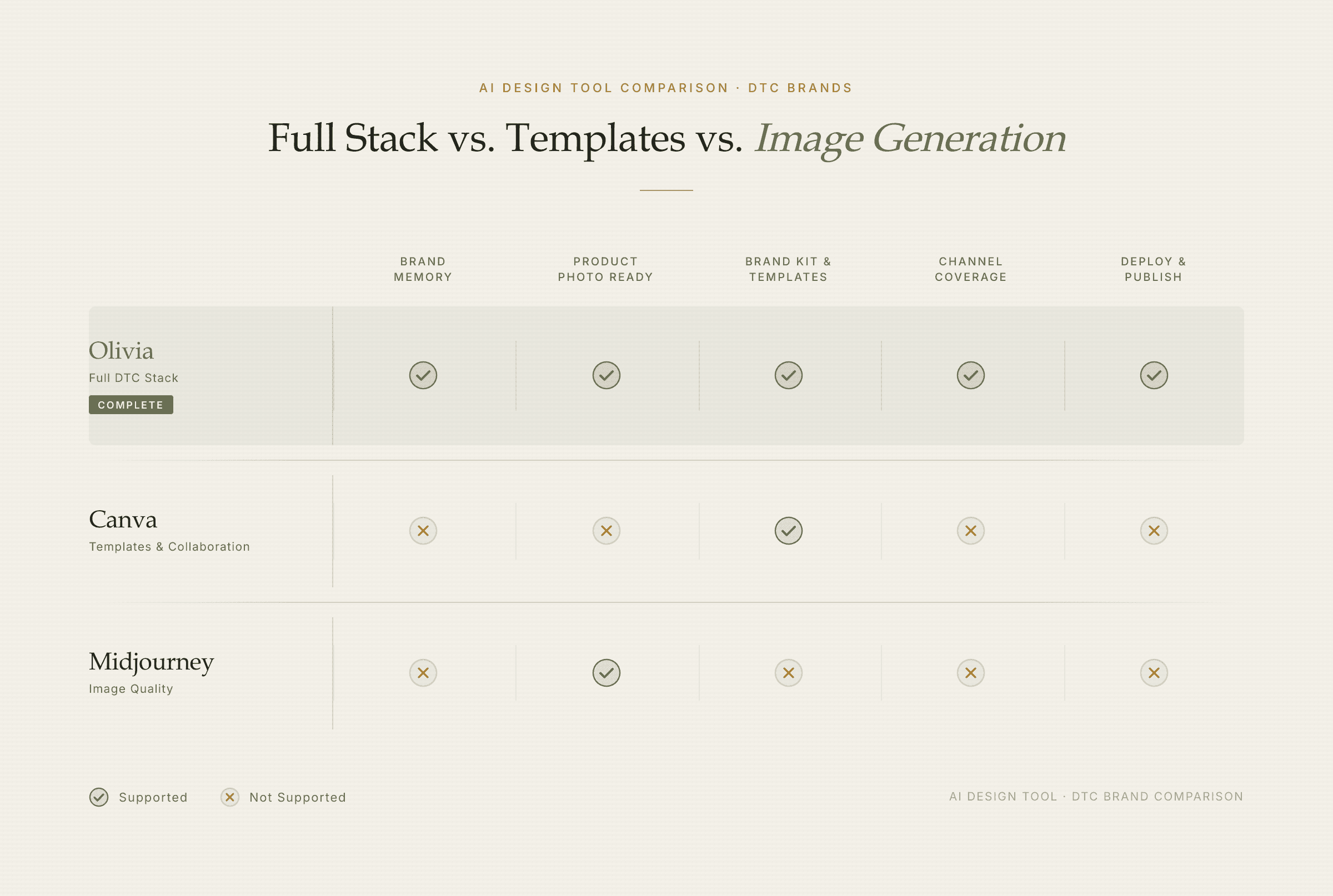
Three different tools solving three different problems — only one covers the full DTC creative stack.
How to Choose the Right AI Design Tool for Your DTC Brand
The right AI design tool depends on what you're actually trying to solve. Image quality alone is the wrong filter — a beautiful file you still have to resize, reformat, and upload manually costs real time. Therefore, weight production-readiness and deploy speed alongside output quality.
Match your situation to the right tool
Need production-ready creative across photos, ads, email, and pages — without rebuilding your brand kit every session? → Olivia (full DTC stack, persistent Brand DNA, one-click deploy).
Need quick social graphics and your team is non-technical? → Canva (template depth, intuitive editor, strong collaboration).
Already a professional designer living in Adobe Creative Cloud? → Adobe Firefly / Express (AI layered into your existing workflow).
Need concept imagery, mood boards, or editorial lifestyle shots? → Midjourney (best raw image quality for creative exploration).
Need human-reviewed product photography with studio quality? → Soona (human QC, 24-hour turnaround, physical studio option).
Running a large enterprise marketing team with a $100K+ budget? → Typeface (brand governance, enterprise security, agentic workflows).
Need a logo and basic brand kit before launch? → Looka or Brandmark (fast, affordable identity generation).
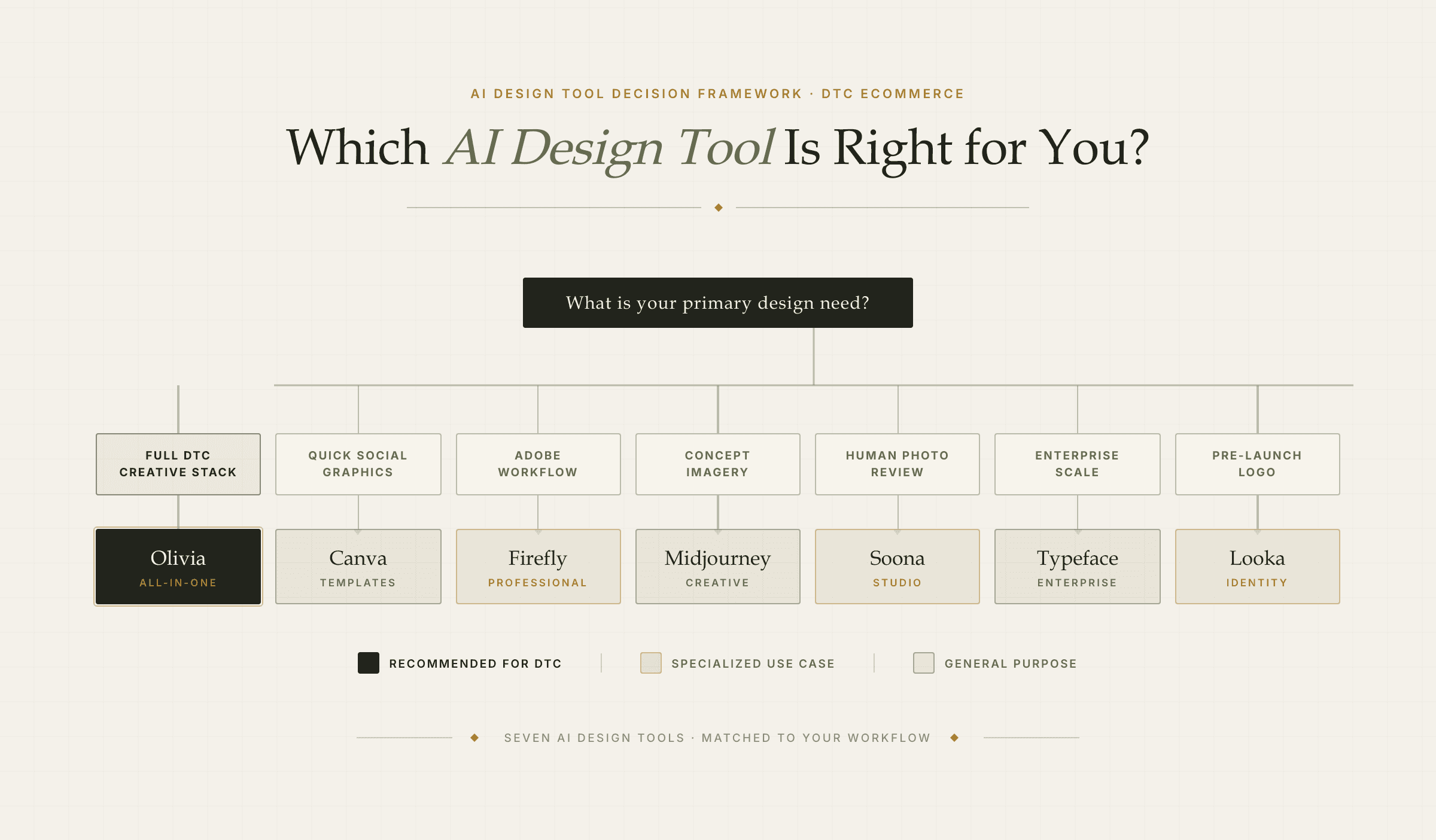
Match your situation to the right tool — then go deeper with the comparison table above.
For ecommerce managers running a Shopify store, the stack question is real: a photographer, a creative agency, an email designer, and a social content tool add up fast. The case for an all-in-one AI design tool isn't just speed — it's the compounding cost of stitching together four separate workflows.
See the full Olivia product suite — product photography, ad creative, email, social, pages, Amazon, and video — all from one brief. Explore Olivia's products or join the waitlist.
What is the best AI design tool for Shopify brands?
Olivia is the strongest AI design tool for Shopify brands because it's purpose-built for DTC physical-product brands, maintains persistent Brand DNA across sessions, and deploys finished creative directly to Shopify with one click. For general templates and social graphics without Shopify deploy, Canva is a solid alternative.
Can AI tools replace a product photographer for ecommerce?
For most catalog and lifestyle photography, yes. AI product photography tools now generate studio-quality images in minutes at a fraction of the cost — traditional shoots run $200–$5,000+ per session, while AI tools produce comparable results at $0.10–$2.00 per image. Hero images for luxury products and texture-heavy goods still benefit from professional photography for flagship pages.
How do AI design tools maintain brand consistency across different formats?
It depends on the tool. Most AI tools (Midjourney, ChatGPT, Gemini) start each session from scratch — no memory of your brand. Canva's Brand Kit applies your colors and fonts to templates but doesn't learn your photography style. Olivia's Brand DNA, by contrast, is learned once and applied automatically to every output across every channel and every session, without re-briefing.
How much do AI design tools cost compared to hiring a creative agency?
AI design tools typically run $15–$1,000/month depending on the platform. An equivalent agency and freelancer stack — photographer, creative agency, designer, and point tools — runs $115,000–$302,000+/year. Olivia is priced at approximately $250–$1,000/month, replacing that full stack for DTC brands.
What's the difference between a general AI image generator and a DTC AI design tool?
A general AI image generator (Midjourney, DALL·E) produces images from prompts but has no brand memory, no product accuracy guarantees, and no channel deploy. A DTC AI design tool like Olivia, on the other hand, is trained on DTC brand data, learns your specific brand identity, produces production-ready output across every channel (photos, ads, email, pages, Amazon), and deploys directly to your store and email platform.
Do AI design tools integrate with Klaviyo and Amazon?
Most don't. Canva, Midjourney, Adobe Firefly, and ChatGPT all export files — you handle the upload and formatting manually. Olivia is the only tool on this list with one-click deploy to Klaviyo, Shopify, and Amazon Seller Central, plus platform-correct export for Meta, TikTok, and Google.

40+ hours saved this week
© 2025 Olivia. All Rights Reserved