AI Product Images
Studio-Quality Photos Without a Shoot

Key takeaways
A good AI product image tool gets you production-ready photos in minutes from a single upload — but output quality varies dramatically: DTC-trained models outperform general image generators on product accuracy.
Traditional product photography costs $500–$3,000+ per shoot and takes 2–4 weeks; an AI subscription runs $250–$1,000/mo and delivers comparable images in 3 minutes.
The two failure modes to screen for: (1) generic AI that looks polished but garbles label text or shifts colors, and (2) tools that hand you a raw file requiring a designer to finish.
Persistent brand memory — a system that learns your visual identity once and applies it to every output — is the feature that separates production-ready tools from one-off generators.
AI product images are fully permitted on Amazon, Shopify, and Google Shopping in 2026, provided the product is accurately represented.
AI product images let you upload one product photo and get back multiple angles, lighting setups, and lifestyle scenes — no studio, no photographer, no post-production. In other words, AI product images make professional ecommerce product photography accessible without a photoshoot. The catch: not every tool delivers production-ready results. This page shows you exactly what to look for, compares the leading tools honestly, and walks through how a purpose-built DTC system gets from brief to published image in 3 minutes.
What AI product images actually are (and what to expect)
You upload one product photo. The AI then generates multiple angles, backgrounds, lighting setups, and lifestyle scenes — no studio booking, no photographer, no retouching queue. A solid tool returns production-ready images in minutes.
That's the promise. In practice, output quality varies widely by tool. DTC-trained models consistently outperform general image generators on the details that matter most: label text fidelity, accurate color rendering, and correct product sizing.
Two failure modes to screen for before you commit to any tool. First: generic AI that produces beautiful-looking images where the label text is garbled, the color is slightly off, or the product proportions are wrong — unusable for ads or PDPs. Second: tools that generate a raw file and stop there, leaving a designer to normalize lighting, crop to spec, and prep for each channel. Both failures cost you the time you were trying to save.
Why DTC brands are replacing photoshoots with AI
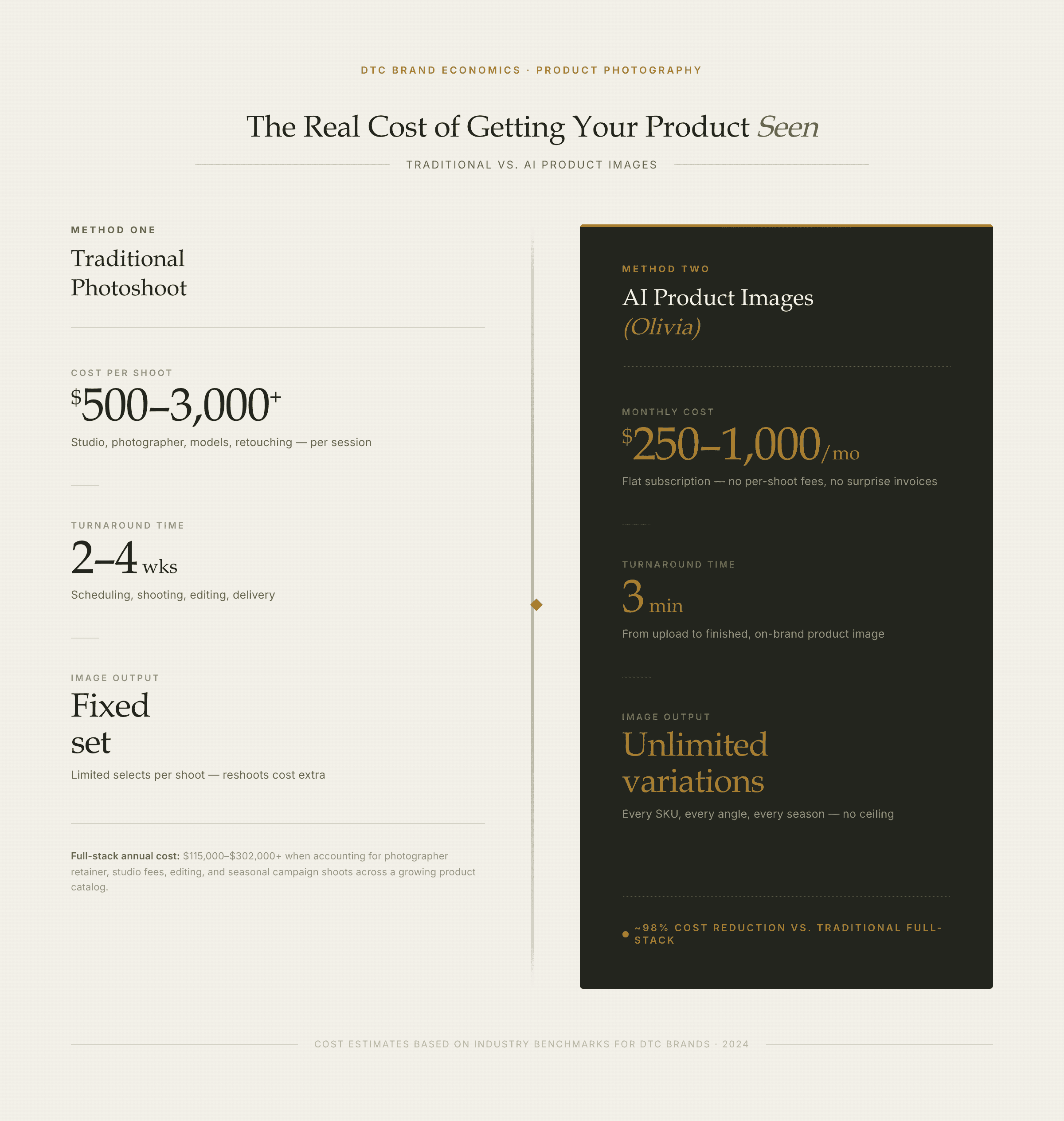
The economics of AI product photography vs. a traditional shoot — at a glance.
Traditional product photography costs $500–$3,000+ per shoot — and that's before retouching, which typically adds 20–50% to the total bill. Furthermore, once you factor in studio rental, shipping, and coordination time, a single shoot day can quietly become $5,000+.
Turnaround is the other constraint. A comparable agency cycle runs 2–4 weeks from brief to delivery. As a result, for a brand launching new SKUs monthly or running weekly paid-media tests, that timeline simply doesn't work.
The math that's driving adoption:
Traditional photography: $500–$3,000+ per shoot, 2–4 weeks turnaround, fixed set of images
AI product image tool: $250–$1,000/mo subscription, new scene or angle ready in 3 minutes, unlimited variations
Annual cost delta: ~98% less than a photographer + retoucher + agency stack ($115K–$302K+/yr vs. $250–$1,000/mo)
Creative refresh cadence: Meta creative fatigues every 2–4 weeks; TikTok weekly — AI is the only way to keep pace without adding headcount
3 minutes vs. 3 weeks. That's the real gap between briefing an AI product image tool and receiving finished images from a traditional agency cycle. For a brand running Meta or TikTok campaigns, where creative fatigue sets in at weeks 2–4 on Meta and weekly on TikTok, a 3-week production cycle means you're always behind the curve.
What makes a good AI product image tool: 4 criteria
Not all AI product image tools are built for the same job. Before you evaluate any specific platform, run it against these four criteria — they're the difference between a tool that saves you time and one that creates a new bottleneck.
1. Product accuracy
This is the #1 failure mode in general AI image tools. The product looks great in the generated image — but the label text is garbled, the color is slightly wrong, or the sizing is off. Consequently, that image is unusable for a PDP, an ad, or an Amazon listing.
Ask directly: does the tool guarantee ~90% accuracy on text, sizing, and product details out of the box? A model trained specifically on product images handles this better than a general image generator repurposed for e-commerce.
2. Brand consistency
Every image you publish needs to match your visual identity: background palette, lighting mood, typography on lifestyle shots. However, general tools start from scratch every session — which means you're re-briefing the model every time, or paying a designer to normalize outputs.
Look for persistent brand memory: a system that learns your brand kit once (logo, colors, typography, photography style) and applies it to every image automatically. Without this, brand consistency becomes a manual tax on every output. Learn more about how Brand DNA works in a purpose-built DTC system.
3. Output variety and format coverage
A traditional photoshoot produces a fixed set of images. By contrast, AI should produce multiple angles, lighting presets, and scene variations from a single upload — and cover the formats you actually need.
Formats to check for:
Square (1:1) for Instagram feed and product pages
9:16 vertical for TikTok, Reels, and Stories
Pure white background for Amazon main image (RGB 255,255,255)
Lifestyle scenes for Meta ads and PDPs
Motion/animation (turntable, parallax, cinemagraph) for video ad creative
4. Deploy path
A production-ready image that still requires manual upload to Shopify, Amazon Seller Central, or your ESP adds back the friction you were trying to remove. Best-in-class tools deploy directly to your channels or export in platform-correct specs — no reformatting, no file management.
This matters most for teams running multiple channels simultaneously. One-click deploy to Shopify, Klaviyo, and Amazon — plus platform-correct exports for Meta, TikTok, and Google — is the difference between a tool and a complete workflow.
See Every AI Product Photography Feature Olivia generates studio-quality product images from a single upload — any angle, 12 lighting presets, any scene — and deploys them straight to Shopify or Amazon. See the features
AI product image tools compared: Olivia, Soona, Adobe Firefly, Midjourney, Canva
Here's how the tools DTC brands most commonly evaluate stack up against the four criteria above. Each has genuine strengths — so the right choice depends on your workflow and what 'production-ready' means for your team.
Tool | Best for | Product accuracy | Brand memory | Channel deploy | Price signal |
|---|---|---|---|---|---|
Olivia | DTC brands needing on-brand images across every channel from one tool | ~90% production-ready out of the box; trained on 10,000+ top DTC brands | Persistent Brand DNA — learned once, applied forever | One-click Shopify, Klaviyo, Amazon; platform-correct exports for Meta/TikTok/Google | $250–$1,000/mo |
Soona | Brands that want human review in the loop for product photos and UGC | High — hybrid AI/studio model with human QA | Per-session; no persistent brand model | Single-format file delivery; no direct channel deploy | Per-image / project pricing |
Adobe Firefly / Express | Teams already in the Adobe ecosystem who need strong general image generation | Good for general scenes; no DTC-specific product training | No persistent brand model; manual re-briefing each session | No direct channel deploy; manual export | Included in Creative Cloud subscription |
Midjourney | Best-in-class image aesthetics for editorial or concept work | Not built for product accuracy; outputs often need a designer pass | No brand memory; starts from scratch every session | No deploy path; file-only output | ~$10–$120/mo |
Canva | Template-based design and teams new to AI creative | Limited product photo generation depth; not DTC-trained | Brand Kit feature (colors/fonts) but no photography-style memory | No direct channel deploy | Free–$55/mo |
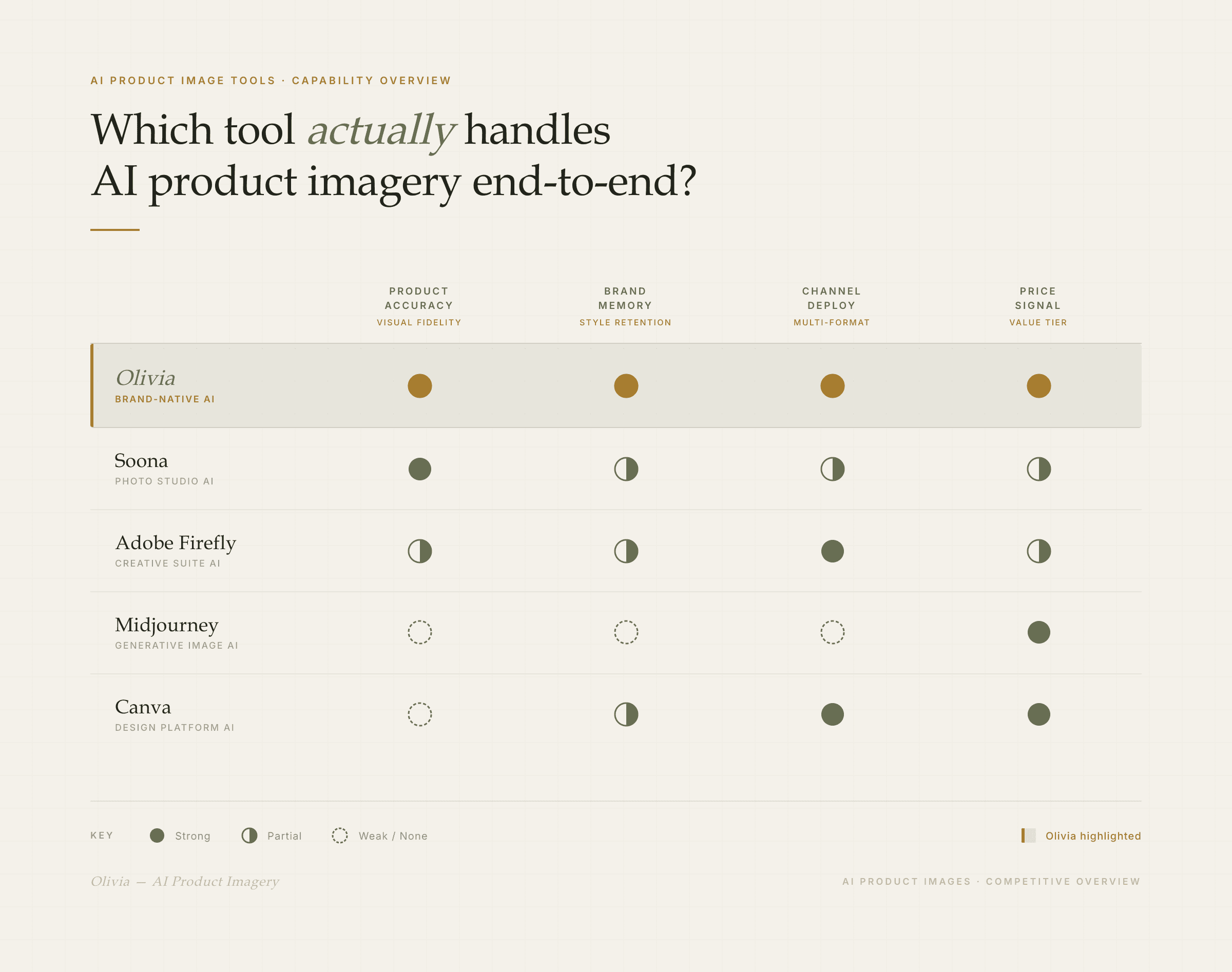
How the leading AI product image tools compare on the criteria that matter for DTC brands.
A note on Soona: its hybrid AI/studio model is a genuine strength if you want a human eye on every output. However, the tradeoff is speed and format breadth — it's a single-format service, not a full creative stack. See a detailed Olivia vs. Soona breakdown if that's your shortlist.
Midjourney produces genuinely beautiful images — it's the right tool for mood boards and editorial concepts. That said, general-purpose tools like Midjourney produce visual drift that makes them unsuitable for production catalogs where images need to look cohesive across listings. See Olivia vs. Midjourney for a direct comparison.
How Olivia generates AI product images: the actual workflow
Here's what the workflow looks like in practice. Olivia's AI product photography is purpose-built for DTC brands — it's not a general image model adapted for e-commerce. As a result, the difference shows up in every step.
From single upload to published image in 5 steps:
Upload one product image and your brand kit (logo, colors, typography, photography style). Olivia stores this as your Brand DNA — you never re-brief it. Every future output inherits your visual identity automatically.
Brief Olivia in plain language — the way you'd talk to a designer: 'Show the serum on a marble surface with soft morning light, square format for Instagram.' No prompt engineering. No design tools to learn.
Olivia generates multiple angles and 12 lighting presets in minutes — all on-brand. Trained on 10,000+ top DTC brands, it handles label text, color accuracy, and product sizing at ~90% production-readiness out of the box.
Review outputs. Roughly 90% need no designer touch-up. If you want to iterate, simply request a variation or a different scene in the same conversation.
Deploy directly to Shopify or Amazon Seller Central, or export in platform-correct specs for Meta, TikTok, and Google — no reformatting, no manual upload queue.
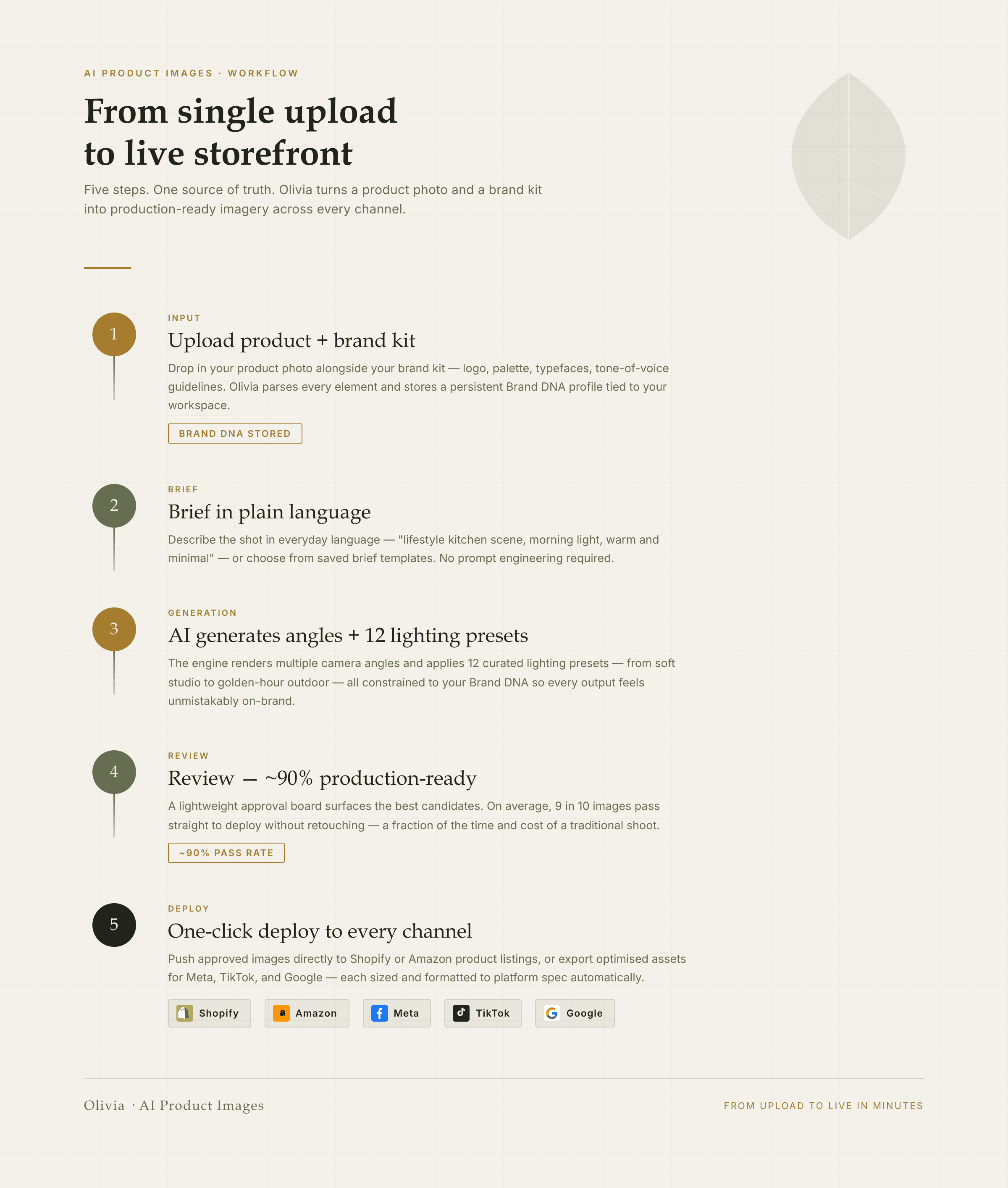
From one product photo to published image — the Olivia workflow in 5 steps.
The time math is not close. A traditional agency cycle — brief, shoot, retouch, deliver — runs 2–4 weeks and costs $500–$3,000+ per shoot. By comparison, Olivia's workflow runs 3 minutes from brief to production-ready image. For a brand refreshing Meta creative every 2–4 weeks and TikTok weekly, that's the difference between keeping pace with creative fatigue and always being behind it.
Need motion? Any static output can be animated in one click using AI motion design — 12 presets including turntable, cinemagraph, and parallax — ready for TikTok or Reels without a separate video production step.
Get Production-Ready Product Images in Minutes Olivia is invite-only with a 300+ brand waitlist. Join now and get on-brand, deploy-ready product images without a photoshoot. Request access
Frequently asked questions about AI product images
Can AI generate product images that are accurate enough to use in ads and on my website?
Yes — with the right tool. DTC-trained AI models achieve ~90% production-readiness on text, sizing, and color accuracy out of the box. In contrast, general image generators (Midjourney, DALL·E) often produce polished-looking images with garbled label text or shifted colors that need a designer pass before they're usable. Therefore, the key is choosing a model trained specifically on product images, not a general image generator repurposed for e-commerce.
How is AI product photography different from a traditional photoshoot?
A traditional photoshoot requires a photographer, studio, props, models, and a 2–4 week production cycle. By contrast, AI product photography takes a single product image and generates multiple angles, backgrounds, lighting setups, and scenes in minutes — no studio, no coordination, no retouching queue. The cost difference is roughly 98%: a traditional photographer + agency stack runs $115K–$302K+/yr; an AI subscription runs $250–$1,000/mo.
Do I need to hire a designer to clean up AI-generated product images?
With a purpose-built DTC tool, usually not. For example, Olivia's AI product photography achieves ~90% production-readiness with no designer touch-up required. General AI tools (Midjourney, standard Firefly), however, typically need a designer pass to normalize lighting, fix product details, and crop to channel specs. Ultimately, the tool you choose determines whether AI saves you design time or just shifts it.
Which AI product image tools work best for Shopify stores?
Tools with direct Shopify integration are the most efficient — they eliminate the manual upload step entirely. Olivia, for instance, deploys finished images straight to Shopify with one click. Canva and Adobe Express work well for teams comfortable with manual export. General generators like Midjourney, on the other hand, require the most post-production before images are Shopify-ready.
How do I keep AI product images consistent with my brand across different channels?
Look for persistent brand memory — a system that learns your brand kit once (logo, colors, typography, photography style) and applies it automatically to every output. Without this, you're re-briefing the model every session or paying a designer to normalize outputs. Olivia's Brand DNA feature stores your visual identity permanently and applies it across every channel: product photos, ads, email, social, and Amazon.
Are AI product images allowed on Amazon listings?
Yes. As of 2026, Amazon permits AI-generated images provided the product is accurately represented and the image meets Amazon's technical specs (pure white background at RGB 255,255,255 for main images, 85%+ frame fill, 2000×2000px minimum). You cannot use AI to misrepresent product scale or generate features that don't exist. AI-generated lifestyle backgrounds, infographic overlays, and A+ content are all permitted.

40+ hours saved this week
© 2025 Olivia. All Rights Reserved